If you're still building proposals by opening last quarter's file, renaming it, and hoping nobody misses the old pricing, you're not dealing with a document problem. You're dealing with a workflow problem.
Organizations often start with a basic Word file because it's familiar. Sales can edit it. Legal can comment on it. Procurement can ask for a PDF at the end. But the minute proposals involve approvals, reusable clauses, multiple reviewers, or a handoff to contract execution, that simple file becomes the weakest point in the process.
Why Your Standard Word Template Is a Bottleneck
A plain Word proposal looks harmless. In practice, it creates avoidable delay at every stage.
Sales copies old text from prior deals. Legal fixes the same clause issues again. Finance catches pricing language that should have been standardized. Operations chases the latest version in email threads with names like final_v4_revised_USE_THIS.docx. Nobody is trying to create risk. The process creates it for them.
Microsoft Word is still the main environment for business proposals, which is why improving the template matters. But format alone doesn't make proposals effective. Microsoft notes that Word remains the dominant platform for creating business proposals, and that shorter proposals convert better. For transactional proposals under $10,000, the guidance is to stay under 10 pages, and about 80% of successful proposals include images according to Microsoft's business proposal guidance.
That matters because most bad proposal systems fail in predictable ways:
- They produce inconsistent outputs. Different reps use different disclaimers, layouts, and pricing formats.
- They create compliance drift. Approved language gets replaced by old language copied from prior deals.
- They hide operational cost. Time disappears into rework, manual data entry, and review loops.
- They weaken brand trust. Buyers notice when a proposal looks stitched together.
A static file can't enforce process. A dynamic template can.
Practical rule: If your proposal template depends on users remembering what to delete, update, or replace, it isn't a real template.
Teams that respond to formal bids often learn this faster than others. If you work in regulated procurement or structured enterprise sales, well-built tender response guides are useful because they force discipline around compliance, structure, and review.
One of the most common sources of proposal failure is still simple human handling. Manual population of names, dates, commercial terms, and scope details creates obvious risk, especially at volume. That's why it's worth looking closely at how manual data entry in proposals leads to errors.
A strong Word proposal template should do more than save formatting time. It should reduce drafting variance, guide users toward approved content, and make the proposal easier to route, review, and convert into a signed agreement.
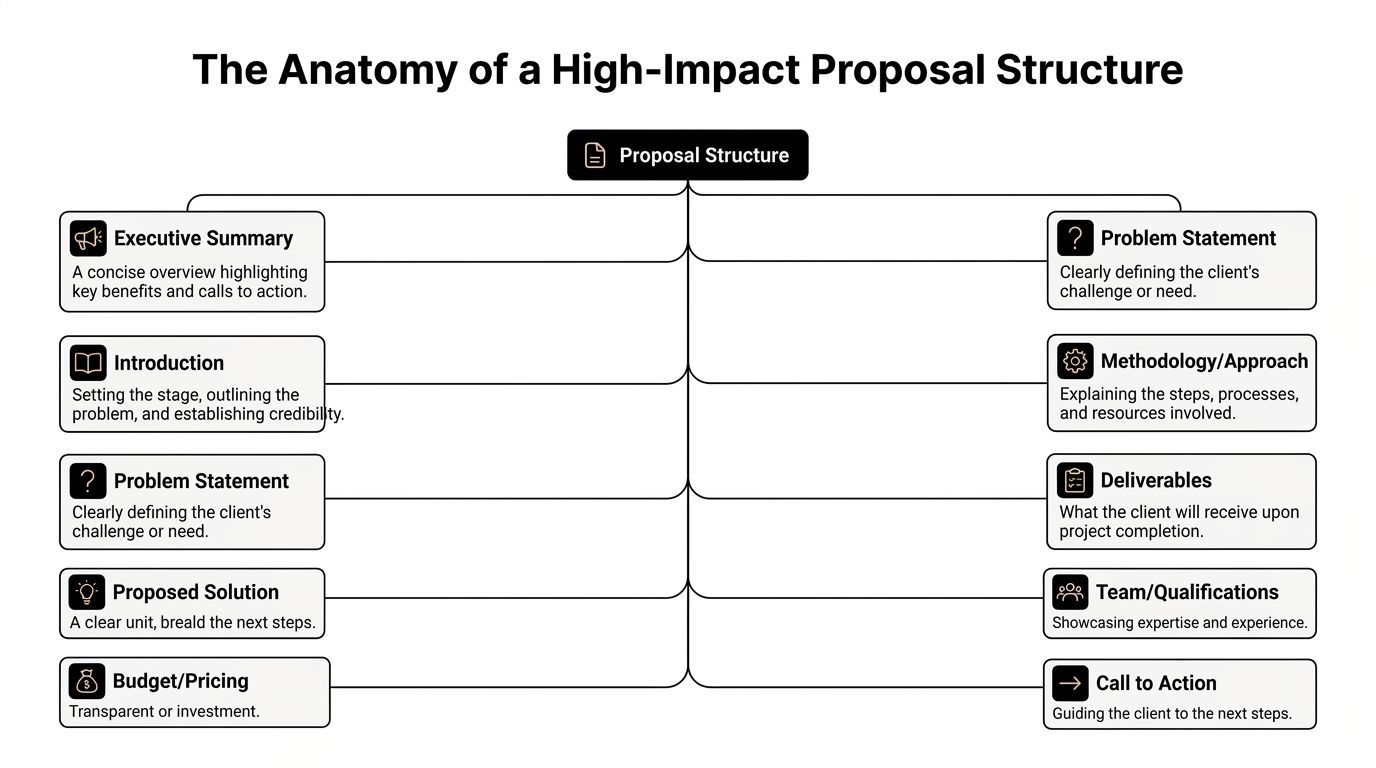
The Anatomy of a High-Impact Proposal Structure
Structure wins before wording does. A proposal that's easy to follow gets read more carefully by legal, procurement, finance, and the business sponsor.
For complex bids, structure is even more important than style. Xait notes that a winning technical proposal template in Word should enforce a 10-section hierarchy, and that readability should stay below a Gunning Fog Index of 12 because excessive jargon is associated with a 15% lower win rate in complex procurement deals in their analysis of proposal writing practice at Xait's technical proposal writing guide.
A practical structure looks like this:
Core sections that should exist in almost every template
Start with a cover page that identifies the client, proposal title, issuing entity, version date, and owner. This sounds basic, but version ambiguity often starts here.
The executive summary should answer three buyer questions quickly. What problem are you solving, why your approach fits, and what action should happen next. If this section reads like internal marketing copy, it won't work.
Then build the operational middle of the document:
- Scope of services. Define what is included, what is excluded, assumptions, dependencies, and client responsibilities.
- Methodology or approach. Show how the work will be delivered, not just what will be delivered.
- Deliverables and timeline. Make handoffs visible. Procurement and operations look for this.
- Pricing and commercials. Keep fees, payment triggers, taxes, renewal logic, and validity periods easy to find.
A strong template also includes company background and team qualifications, but these should support the deal, not overwhelm it. Buyers care more about relevant proof than generic history.
Readability and compliance need to be built in
The legal team usually isn't the primary audience for the opening pages, but they care significantly about the sections that shape commitment. Terms and conditions shouldn't be dropped in at the end as an afterthought. They should be integrated cleanly into the template so commercial and legal reviewers can see the full offer in one pass.
Keep the language plain enough that a finance approver and a technical evaluator can reach the same understanding without calling legal to translate it.
That is where many templates fail. They mix sales language, legal language, and delivery language without hierarchy. The result is friction.
A better pattern is:
| Section | What it needs to do |
|---|---|
| Executive Summary | Frame the business case and next step |
| Scope | Limit ambiguity and define boundaries |
| Commercials | State price, terms, and payment logic clearly |
| Legal Terms | Protect risk position with approved wording |
| Signature or acceptance block | Make acceptance operationally simple |
For teams refining proposal content, this breakdown aligns well with the practical checklist in essential elements of a sales proposal.
Crafting Reusable and Compliant Contract Clauses
Most proposal bottlenecks don't come from the headline sections. They come from the paragraph-level language that everyone keeps rewriting.
Payment terms, confidentiality, liability caps, IP ownership, term and termination, warranty language, data handling, governing law. These clauses determine how much legal review your proposal triggers. If they're inconsistent, every deal becomes a fresh negotiation.
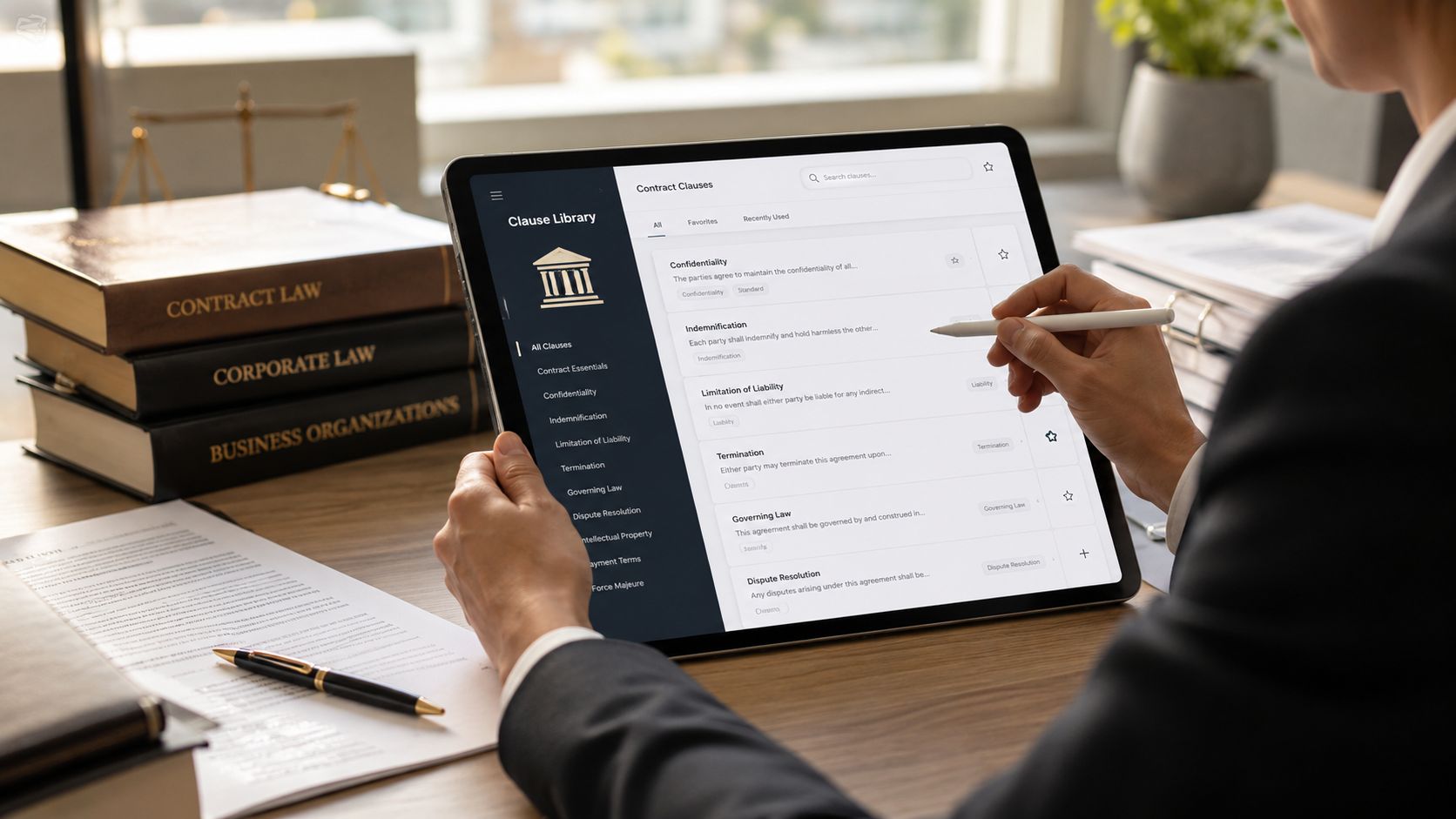
Build a clause library, not a folder of old files
A reusable clause library should separate approved language by topic, risk level, jurisdiction, and deal type. That way a sales proposal for a low-risk services engagement doesn't pull in the same fallback text used for a strategic enterprise agreement.
Focus first on clauses that create repeat review:
- Payment schedules. Include due dates, invoicing triggers, disputed invoice handling, and late payment language if your policy uses it.
- Limitation of liability. Maintain approved primary and fallback positions. Don't let reps improvise this.
- Confidentiality. Align proposal language with your standard NDA position where possible.
- Intellectual property rights. Define ownership of pre-existing materials, deliverables, and license rights.
- Termination conditions. Clarify notice periods, cure rights, and payment obligations on termination.
A good library also explains when a clause should be used. Clause text without usage notes still creates inconsistency.
What works in Word, and where Word starts to strain
Word can handle clause management up to a point. Quick Parts, locked sections, and internal drafting notes can make a template much more reliable than copy-paste drafting.
But once you need governed alternatives, usage rules, or clause suggestions based on contract type, a basic document starts to show its limits. That's where teams usually move toward a centralized system for approved language and guided drafting. One example is a workflow that uses clause library auto suggestions in Legitt Draft to surface pre-approved wording during drafting instead of relying on memory or old files.
Working standard: If legal has already approved language for recurring terms, the business shouldn't be rewriting it in live deals.
That shift matters for AI contract management and contract automation because the value isn't just faster drafting. It's controlled drafting. A proposal system becomes scalable only when the reusable text is standardized, searchable, and tied to approval policy.
Mastering Word Features for Smart Template Design
Word is often underused. It's treated like a blank page editor instead of a controlled drafting tool.
A reliable Word proposal template should guide users, limit unnecessary edits, and preserve formatting. You can do a lot of that without buying new software.
Use styles and controls to prevent drift
Start with Styles. Heading styles, body text styles, table styles, and caption styles let you standardize the document globally. If a proposal has to be reformatted by hand every time a rep edits it, your template isn't doing its job.
Then add Content Controls from the Developer tab. These are useful for fields such as:
- Dropdown lists for proposal type, region, governing entity, or payment model
- Date pickers for issue date, expiration date, or project start date
- Rich text controls for scope summaries or assumptions
- Plain text controls for legal entity names and signatory details
These elements reduce editing mistakes because users fill guided fields instead of altering the layout itself.
Use building blocks for approved content
Quick Parts are one of the most practical features in Word for legal operations and sales enablement teams. You can store approved blocks for company descriptions, implementation methodology, legal notices, acceptance language, or common appendices.
That means the user inserts a vetted section instead of searching shared drives.
Here is a practical setup:
| Word feature | Best use in a proposal template |
|---|---|
| Styles | Brand consistency and clean navigation |
| Content Controls | Guided input and fewer editing errors |
| Quick Parts | Reusable approved text blocks |
| Section protection | Locking boilerplate from casual edits |
The final step is often missed. Save the master as a .dotx file, not as a normal document. That forces each new proposal to begin as a fresh instance instead of a recycled prior file with hidden edits and comments.
For teams that want to keep Word in the drafting workflow while adding smarter contract review and contract drafting support, drafting contracts in Microsoft Word with integrated workflow tools is the direction to study.
Word can absolutely be part of an enterprise contract workflow. It just can't be the whole workflow.
From Static Template to Dynamic Contract Workflow
A well-designed Word proposal template is a strong foundation. It still doesn't solve version control, approvals, signature routing, repository management, renewal tracking, or contract intelligence.
That gap is where many teams stall.
They improve the template, but the operating model stays the same. Draft in Word. Email to legal. Wait for redlines. Forward to finance. Export to PDF. Send for signature through another tool. Save the signed copy in a folder nobody can search properly. Then months later, someone asks what was agreed.
Where the manual model breaks
The problem isn't Word itself. The problem is relying on a document as if it were a system.
Common failure points include:
- Version confusion caused by attachments and local saves
- Approval delays because routing happens through inboxes, not workflows
- Poor visibility into status, blockers, and ownership
- Disconnected eSignature that forces another manual handoff
- No structured repository for executed documents, amendments, or obligations
That is why Contract Lifecycle Management matters. CLM software connects drafting, review, negotiation, approval workflows, eSignature, repository management, renewals, and reporting into one operating layer.
Manual workflow vs AI-powered CLM
| Feature | Manual Word Method | AI-Powered CLM Method | Business Benefit |
|---|---|---|---|
| Drafting | Start from old files or static templates | Start from governed templates with guided inputs | Less rework and better consistency |
| Review | Email attachments and tracked changes across versions | Centralized review with comments, redlines, and audit trail | Faster collaboration and clearer accountability |
| Approvals | Informal routing by email or chat | Structured approval workflows by rule | Better compliance and fewer missed signoffs |
| Signature | Export and send through a separate step | Built-in eSignature with status visibility | Cleaner execution handoff |
| Storage | Shared folders and manual naming conventions | Searchable repository with metadata | Easier retrieval and audit readiness |
| Post-signature management | Manual reminders and spreadsheets | Renewal alerts, obligation tracking, and contract analytics | Reduced leakage and stronger governance |
Some teams start with renewal pain as the trigger for modernization. If that's the issue, a focused example like Supercenter's contract renewal solution helps illustrate what structured renewal tracking looks like in practice.
A practical next step is to connect proposals directly to downstream contracting. That avoids rekeying data and recreating commercial terms after buyer acceptance. The cleanest operating model is one where the proposal can be transformed into the executable agreement with controlled carryover of pricing, scope, and legal terms. That's the logic behind workflows that convert a proposal into a contract.
For organizations moving into AI contract review, contract analytics, and enterprise legal technology, a platform approach becomes particularly advantageous. A system such as Legitt AI can sit on top of the familiar drafting workflow and add AI-powered contract drafting, review, negotiation support, approval routing, eSignatures, searchable repository management, obligation tracking, and contract intelligence in one environment.
Frequently Asked Questions About Proposal Templates
How can I track when a prospect opens my Word proposal
A Word file by itself won't give you dependable open tracking in the way proposal software or CLM platforms can. Once you email a document or a PDF attachment, visibility becomes limited.
If tracking matters, use a system that controls document sharing, logs activity, and ties the proposal to your sales or contract workflow. That gives sales, legal operations, and revenue operations a clearer record of engagement.
A proposal that's opened, reviewed, redlined, and approved inside one system is easier to manage than a file sent into an inbox with no trace.
Can AI write the whole proposal for me
AI can help draft a first version, suggest clauses, summarize requirements, and adapt language for different deal types. It can also support contract review by spotting deviations from approved terms.
It shouldn't replace judgment. A proposal still needs a human to validate scope, tailor the commercial position, confirm legal acceptability, and make the case persuasive for the buyer. The strongest use of AI contract automation is supervised drafting, not unsupervised commitment.
What's the best way to manage versions with multiple collaborators
Use one controlled source of truth. If multiple people are editing attachments, version sprawl is unavoidable.
A practical collaboration model includes:
- Named ownership for drafting, legal review, and final approval
- Tracked changes in one record instead of parallel offline edits
- Comment resolution history so reviewers can see why language changed
- Repository storage for draft, negotiated, and executed versions
Should proposal terms and contract terms live separately
Only if you want duplication and reconciliation work. In many organizations, proposal language sets commercial expectations that later need to be rebuilt in the contract.
A better approach is to design the proposal template so critical commercial and legal terms can flow into the contract lifecycle with minimal rewriting. That improves compliance and shortens the path to signature.
When should a company move from Word templates to CLM software
Usually when one of these conditions appears:
- Volume increases and manual review starts delaying deals
- Risk increases because teams negotiate more exceptions
- More departments join the process, including finance, procurement, and security
- Post-signature work matters, such as renewals, obligations, and repository search
If your team is still using Word, start by fixing the template. If the business already feels the cost of approvals, redlines, scattered files, and missed follow-up, you're past the template stage. You need a system.
If you're ready to turn a basic Word proposal template into a governed contract workflow, Legitt AI is worth evaluating. It supports drafting, review, approvals, eSignatures, repository management, renewals, and contract intelligence in one workspace, which makes it easier for legal, sales, procurement, and operations teams to work from the same record instead of passing documents across disconnected tools.