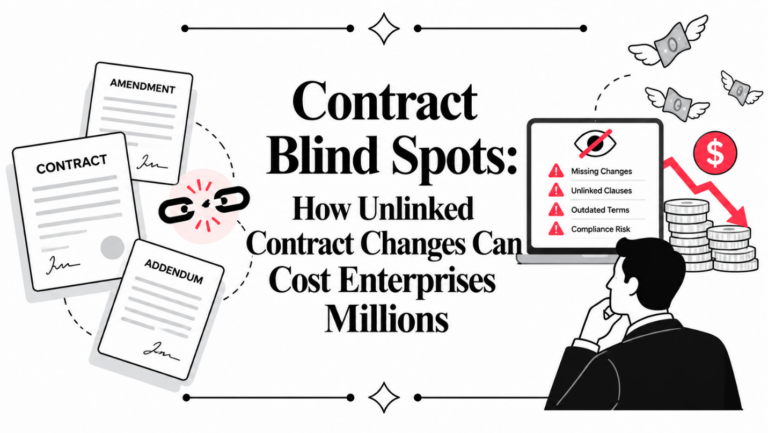
A sales leader pings legal for a simple update: Is the customer contract signed, approved, and ready to bill? Someone opens Outlook, someone else checks a shared drive, and a third person searches an aging spreadsheet called “Contracts Master Final v6.” Ten minutes later, nobody is fully confident in the answer.
That's where most contract operations begin. Not with a polished contract lifecycle management platform, but with email folders, Word files, and a spreadsheet that slowly becomes the system of record by default.
A well-built Contract Template Excel file can bring real order to that chaos. It can centralize key metadata, make renewal risk visible, and give legal, procurement, sales, and operations teams a shared working view. But it only works if you build it like a controlled business system, not a casual tracker. And eventually, every team reaches the point where Excel stops being helpful and starts creating risk. That's the moment many organizations move from static tracking to smarter workflows, the shift explored in why so many teams are still stuck in dumb contracts.
From Contract Chaos to Control
The first win in contract management isn't automation. It's visibility.
If your contracts live across inboxes, shared folders, procurement portals, and individual laptops, the immediate problem isn't clause intelligence or AI review. It's that nobody can answer basic operational questions quickly. Which agreements renew this quarter? Which vendor contract is still unsigned? Which customer paper is sitting with finance?
That's why Excel remains a common starting point for legal ops. It's available, familiar, and flexible enough to impose structure on messy contract data. Small legal teams, founders, procurement managers, and sales operations leads often start there because they need control now, not after a long software rollout.
What Excel does well at the start
A spreadsheet works best when you need to create a single intake and tracking layer for contract metadata. It gives you:
- A basic system of record: One file for contract ID, counterparty, owner, dates, status, and value.
- Fast filtering: Sort by renewal month, department, or contract type without waiting on IT.
- Low-friction adoption: Users typically already know how to update a row.
- Early reporting: Even a simple active vs. expired view helps leaders make decisions faster.
Practical rule: If your current process requires people to ask around for status, you don't have contract management. You have contract hunting.
Where teams usually go wrong
The problem isn't using Excel. The problem is using it casually.
Teams often build a tracker that captures only the obvious fields, then wonder why reporting is weak later. Or they skip governance entirely, which leads to duplicate rows, inconsistent naming, and silent formula errors. At that point, the spreadsheet still exists, but trust in the data starts to fade.
A Contract Template Excel setup should be treated like an operating tool. Every field needs a purpose. Every status should have a clear definition. Every date should drive action.
That's how you turn a spreadsheet from a passive list into a working legal operations asset.
The Anatomy of an Effective Contract Template
A usable spreadsheet is not the same thing as a durable contract tracker. The difference is structure.
A contract template in Excel serves as a pre-built spreadsheet designed to provide structured fields for key details such as contract ID, parties, terms, and expiration dates. These templates typically include columns for tracking contract status, value, and renewal dates, using conditional formatting to visually highlight contracts nearing expiration, such as red for less than 30 days, amber for 30–90 days, and green for 90+ days, as outlined in this Excel contract template guide from Portant.
A strong template should look less like a casual list and more like a lightweight database.
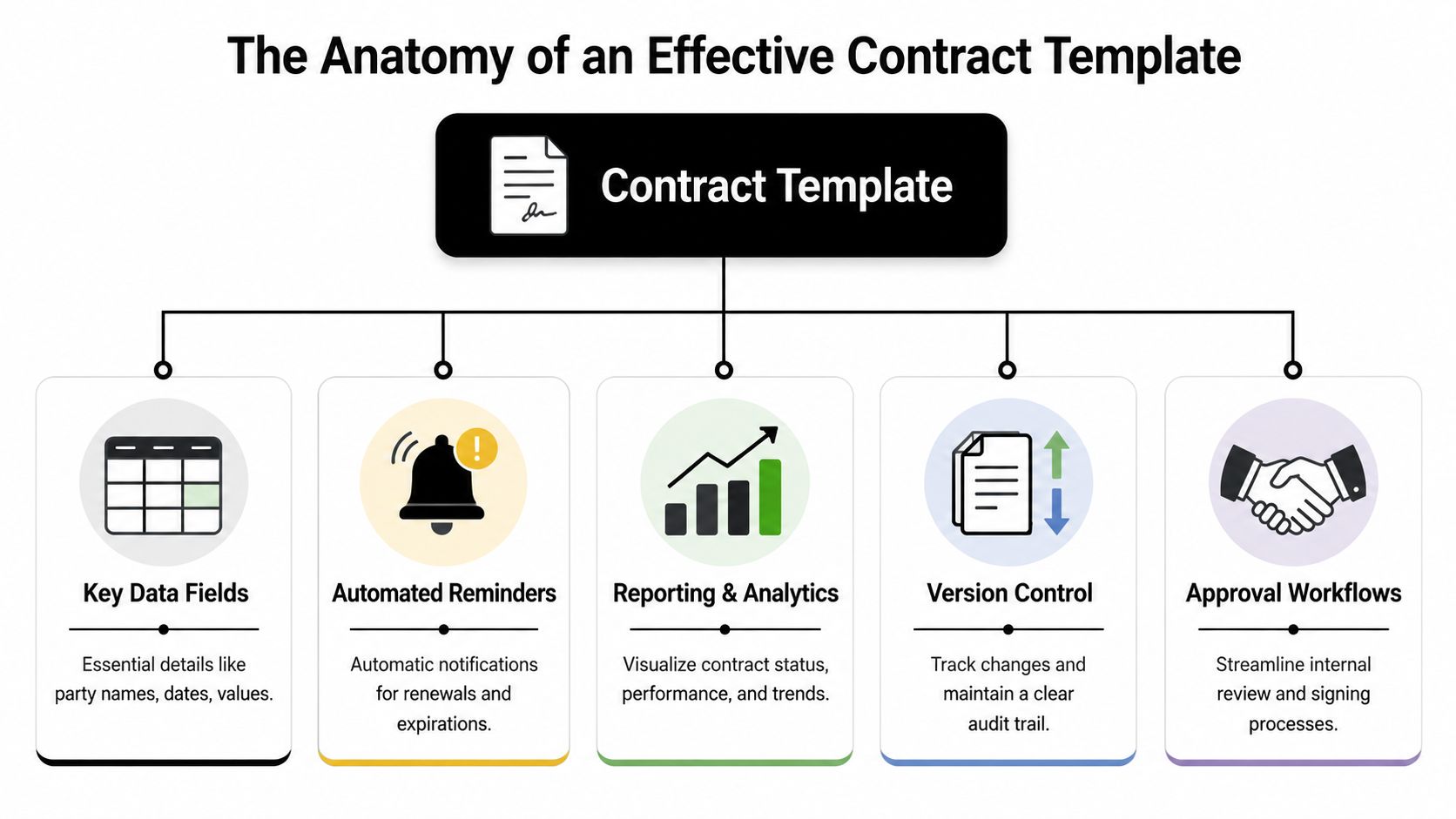
For a deeper read on how contract structure affects downstream management, this breakdown of the anatomy of a contract is worth reviewing alongside your spreadsheet design.
The fields that actually matter
Start with the fields that support daily operations, not just archival storage.
| Column | Why it matters |
|---|---|
| Contract ID | Creates a unique reference point for reporting and avoids confusion between similar agreements |
| Contract Name | Gives the business a readable label for quick searching |
| Counterparty | Identifies the customer, vendor, partner, or contractor involved |
| Contract Type | Separates NDAs, MSAs, SOWs, order forms, SaaS agreements, and vendor paper |
| Internal Owner | Makes accountability visible |
| Effective Date | Establishes when obligations begin |
| Expiration Date | Drives renewal tracking and risk monitoring |
| Renewal Date | Helps teams act before auto-renewal windows close |
| Status | Tracks lifecycle stage such as Draft, In Negotiation, Active, Expired, or Terminated |
| Value | Supports financial reporting and prioritization |
| Repository Link | Connects metadata to the actual document |
| Key Obligations | Flags deliverables, notice periods, payment milestones, or reporting duties |
What many templates miss
Most spreadsheet trackers stop at dates and counterparties. That's enough for basic inventory, but not for real management.
Add fields that support workflow decisions:
- Paper source: Customer paper, vendor paper, or your standard template.
- Approval status: Legal approved, finance approved, security approved, business approved.
- Risk status: Healthy, At Risk, or Progress Halted.
- Version reference: Latest draft name or repository location.
- Notice period: Useful for non-renewal rights and termination windows.
The best spreadsheet templates don't just tell you what a contract is. They tell you what needs to happen next.
A simple model to copy
Use a controlled row structure like this:
| Contract ID | Contract Type | Counterparty | Owner | Effective Date | Expiration Date | Renewal Date | Status | Value | Obligation Note |
|---|---|---|---|---|---|---|---|---|---|
| CTR-001 | NDA | Vendor A | Legal | [date] | [date] | [date] | Active | [amount] | Review confidentiality end date |
| CTR-002 | MSA | Customer B | Sales Ops | [date] | [date] | [date] | In Negotiation | [amount] | Await finance approval |
Keep naming conventions tight. If one user enters “Master Service Agreement,” another enters “MSA,” and a third enters “Services Contract,” your reporting will fragment fast.
That's the hidden skill in building a Contract Template Excel tracker properly. You're not creating rows. You're defining a contract data model.
Building Your Dynamic Template Step by Step
A spreadsheet becomes useful when it starts surfacing action without someone manually scanning every row.
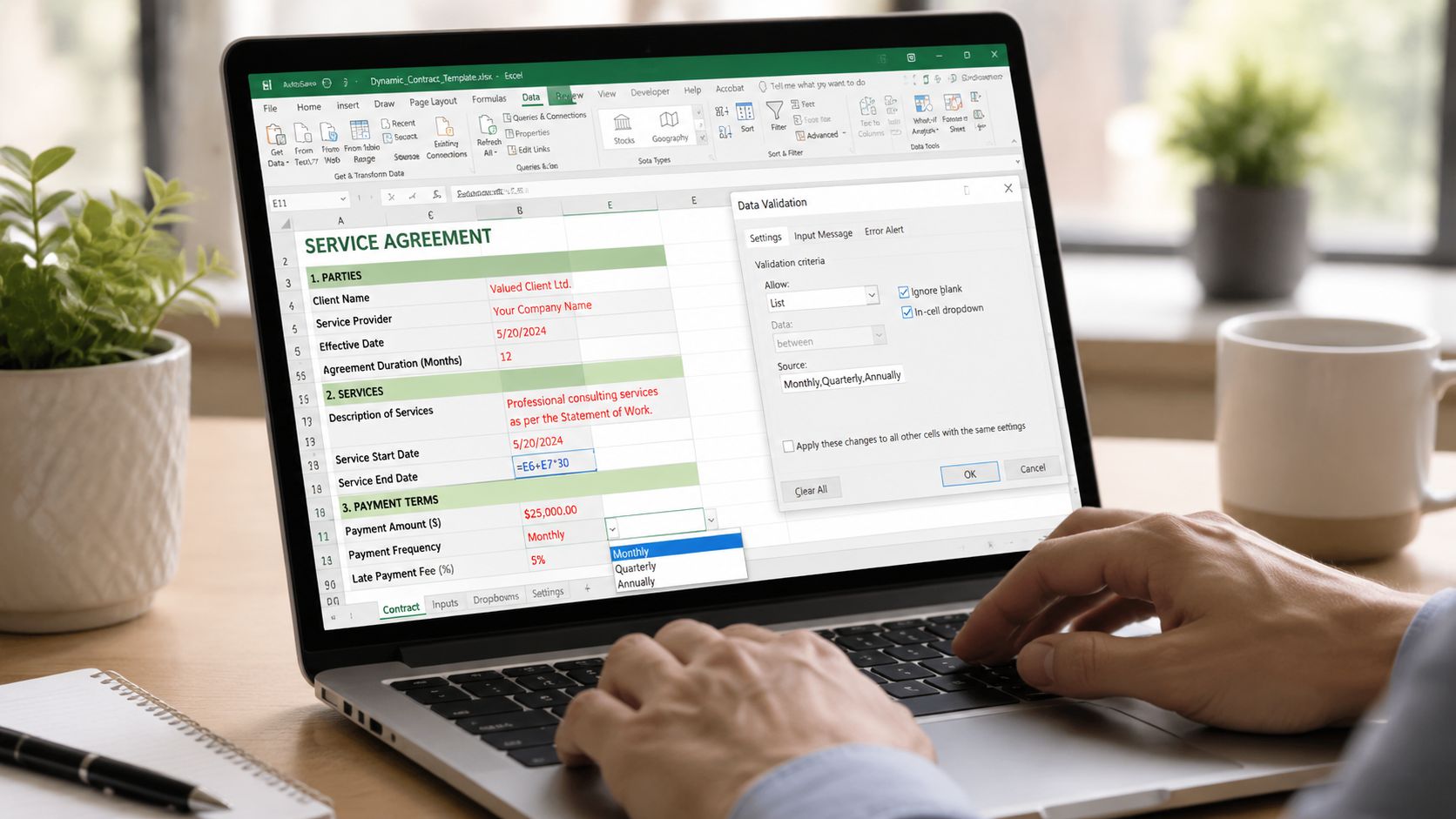
An Excel contract template functions with mandatory fields and uses conditional formatting algorithms to automatically flag contracts approaching expiration. The technical causality is that using built-in Excel formulas like TODAY() logic combined with conditional formatting creates a dynamic cause-effect alert system: as the current date approaches the Expiration Date, the cell color shifts, forcing user intervention, as described in this Smartsheet contract management template resource.
Step one, calculate days to expiry
Add a column called Days to Expiry.
If your Expiration Date sits in cell G2, use a formula pattern based on today's date and the contract end date. The practical logic is simple:
- If the contract has an expiration date, subtract today's date from it.
- If the cell is blank, return blank.
- If the date has passed, the result becomes negative or zero depending on your setup.
This creates a live countdown without manual review.
A simple operating pattern looks like this:
- Store the date cleanly: Make sure the Expiration Date column uses actual date formatting.
- Calculate automatically: Use a days-remaining formula tied to the expiration field.
- Filter by urgency: Sort ascending to bring immediate risks to the top.
Step two, apply visual alerts
A number alone won't get attention. Color will.
Set conditional formatting rules on the Days to Expiry or Expiration Date column so the spreadsheet highlights risk immediately:
- Red: Less than 30 days
- Amber: 30 to 90 days
- Green: 90+ days
That mirrors a widely used contract management pattern and makes the file instantly scannable for renewals, notice periods, and at-risk obligations.
When legal ops teams say a spreadsheet “works,” they usually mean one thing: a manager can open it and spot the problem rows in seconds.
You can apply similar formatting to other risk indicators:
- Pending approvals: Highlight rows where status is stuck in Internal Review.
- Missing repository link: Flag blank document-link cells.
- Unsigned contracts: Color rows where execution status remains open past the intended effective date.
Step three, lock down data quality
Most spreadsheet failures come from inconsistent entry, not bad formulas.
Use data validation to enforce dropdowns for fields like:
- Contract Type
- Status
- Business Unit
- Risk Level
- Owner
Consistency is of paramount importance for reporting. If one status says “Active” and another says “active ” with a trailing space, your pivot tables will split them.
A useful pattern is to maintain a separate tab for controlled lists. Name that tab something obvious, like “Reference Data,” and keep your allowed values there. Then point dropdowns to those ranges.
Step four, use named ranges for maintainability
Named ranges make a Contract Template Excel file easier to understand and less brittle when the sheet evolves.
Instead of pointing formulas and validations to vague cell references, define ranges such as:
- ContractTypeList
- StatusList
- OwnerList
- ExpiryDates
This helps when new rows are added, fields move, or multiple people maintain the file. It also makes handoff easier if legal ops built the template but procurement or sales operations now updates it.
Step five, create a lightweight dashboard view
You don't need advanced Excel engineering to make the tracker useful for leadership.
Create a summary tab that shows:
| Dashboard element | What it answers |
|---|---|
| Active contracts | How many live agreements are in force |
| Expiring soon view | Which contracts need attention now |
| By owner | Who is carrying the current workload |
| By contract type | Where negotiation volume is concentrated |
| By status | How much work is in draft, review, or execution |
Use filters, simple counts, and pivot tables. Keep it readable. The dashboard should support a weekly business review, not become a side project.
Step six, connect the row to the document
A contract tracker without document access still forces people back into shared drives.
Add hyperlinks to the latest draft or executed PDF. If your organization stores files on a shared network drive, SharePoint, or another document repository, link the row directly to the underlying contract. That one design choice saves real time and cuts status confusion during approvals, contract review, and eSignature follow-up.
Securing Your Template and Managing Versions
A spreadsheet that tracks contracts is only useful if people trust it. Trust comes from control.
Excel provides flexibility, but data integrity is paramount, requiring regular backups, version control mechanisms such as saving multiple versions with clear file naming conventions, and password protection or locked cells to discourage unauthorized editing. Hyperlinks can also be used to link to contract documents stored on shared drives, as noted in this Excel contract management template overview from Juro.
That advice is practical. It's also incomplete if your contract volume is growing.
What you should secure immediately
At a minimum, protect the mechanics of the file even if the data itself still needs active maintenance.
- Lock formula cells: Prevent accidental overwrites in calculated columns.
- Protect the worksheet structure: Stop users from deleting tabs or changing headers casually.
- Password-protect editing: Discourage unauthorized changes where appropriate.
- Back up regularly: Store clean historical copies in a controlled location.
- Use disciplined file naming: Month, owner, and approved version labels reduce confusion.
If your documents live elsewhere, this guide to tamper evidence and document integrity controls gives useful context for what spreadsheet protection can't solve after signature.
The version problem never really goes away
Here's the hard truth. Locked cells and file names are workarounds, not a true governance model.
A common pattern looks like this:
| File behavior | Operational risk |
|---|---|
| Local copies get saved by different users | Teams work from different data sets |
| Formula columns are manually edited | Alerts break silently |
| Document links point to outdated drafts | Users review the wrong contract version |
| Updates happen by email request | Audit history becomes unreliable |
A spreadsheet can show the latest status only if everyone agrees what “latest” means and updates the same file every time.
That's difficult once legal, procurement, finance, sales, and operations all touch the process. Version control becomes especially fragile when negotiations move quickly and multiple contract versions circulate during review and approval.
The compliance gap
Excel can discourage bad edits. It can't provide strong access permissions, dependable real-time collaboration, or a clean audit trail across the full contract lifecycle.
That matters when you need to answer questions like:
- Who changed the renewal date?
- Which version was approved internally?
- Did anyone alter a payment term after business sign-off?
- Which document was signed?
For a small portfolio, you can manage that risk with discipline. For an expanding contract operation, discipline alone stops being enough.
When Excel Breaks Graduating to a CLM Platform
Organizations often don't switch from spreadsheets to CLM software because they suddenly love legal tech. They switch because Excel stops protecting the business.
The breaking point usually arrives subtly. A renewal notice gets missed. Sales negotiates from an outdated draft. Procurement can't tell which vendor agreements include key security terms. Leadership asks for a portfolio report and legal spends half a day reconciling rows.
A frequently asked question is how to automate obligation tracking and risk analysis without manual Excel updates. Data shows 60% of legal teams using Excel miss critical deadlines because they rely on manual reviews instead of automated alerts, and locked cells can create false security while preventing real-time collaboration, leading to version chaos, according to this analysis of Excel contract management limits.
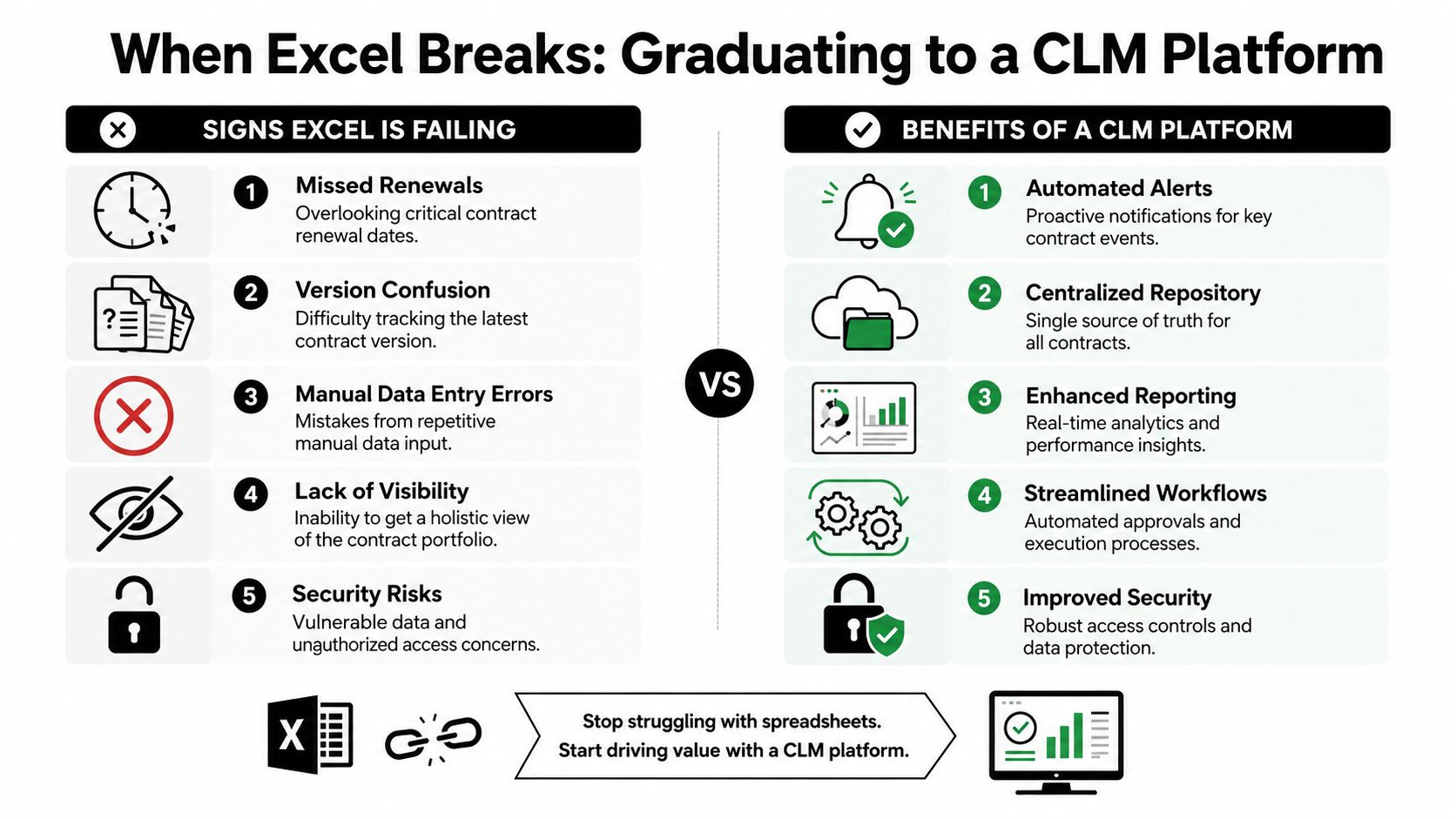
For teams reaching that point, this practical look at how to move beyond Excel for dynamic contract reporting captures the operational shift well.
Signs your spreadsheet has become a risk surface
You don't need a massive legal department to outgrow Excel. You only need recurring coordination failure.
Watch for these signs:
- Renewals depend on calendar reminders: Your process breaks when one person is out.
- Approvals happen over email: Nobody has a clean record of who signed off and when.
- Reporting requires manual cleanup: Different naming conventions make portfolio analysis unreliable.
- Document history is fuzzy: Users aren't sure which draft is the approved version.
- Access is too broad or too narrow: Either everyone can edit, or collaboration slows to a crawl.
What a real CLM changes
A dedicated contract lifecycle management platform replaces the spreadsheet's weak points with system controls.
| Excel tracker | CLM platform |
|---|---|
| Manual row updates | Automated lifecycle tracking |
| Separate files and shared drives | Centralized repository |
| Color-coded renewal alerts | Workflow-based notifications and tasks |
| Informal version naming | Managed version history |
| Limited permissions | Role-based access control |
| Static reporting | Live contract analytics |
That difference matters across the business. Legal gets cleaner review workflows. Procurement gets obligation tracking. Sales gets faster approvals and execution visibility. Operations gets a searchable repository. Leadership gets reliable reporting.
The decision rule that works in practice
Excel is still fine when your priority is getting initial control over a small contract set. It's not fine when contracts drive revenue recognition, vendor risk, audit readiness, or cross-functional approvals.
If a missed date, wrong version, or hidden clause can create commercial or compliance exposure, you're already beyond spreadsheet territory.
At that stage, the better question isn't “Can we keep making Excel work?” It's “How much manual effort and hidden risk are we still willing to accept?”
The AI Powered Alternative From Static Sheets to Smart Workflows
The biggest difference between a spreadsheet and modern contract operations isn't storage. It's intelligence.
A spreadsheet records what someone typed into it. An AI-enabled contract workflow can draft agreements, review incoming paper, route approvals, extract clauses, monitor obligations, and surface risk across the repository. That changes how legal teams scale, how procurement manages suppliers, and how sales moves from draft to signature.
AI-powered contract review reduces the time to analyze an NDA from 92 minutes for a human lawyer to just 26 seconds, achieving 94% accuracy in deviation detection, according to these CLM statistics on AI contract review.
A broader overview of how these capabilities fit into legal operations appears in this article on AI in contract lifecycle management.
Where AI creates practical value
The strongest AI contract management tools improve work that legal and business teams already do every day.
- Drafting from approved templates: Business users can generate first drafts with controlled language instead of recycling old contracts.
- Contract review on third-party paper: AI flags clause deviations, missing protections, and negotiation hotspots before counsel starts redlining.
- Approval workflow automation: Contracts route to legal, finance, security, and business owners in a structured sequence.
- Repository intelligence: OCR, metadata extraction, and clause indexing make legacy agreements searchable.
- Renewals and obligations tracking: The system pushes reminders based on dates and commitments embedded in the contract.
Why this matters outside legal
Contract data doesn't live in a vacuum. Sales, procurement, revenue operations, finance, and customer teams all depend on it.
For example, account planning becomes stronger when contract milestones line up with account strategy, ownership, and expansion timing. Teams building coordinated commercial motions can also benefit from resources on real-time sales intelligence, especially when they want contract events to inform account-level execution rather than sit in a spreadsheet no one checks.
Good contract intelligence doesn't just reduce legal effort. It gives the business earlier visibility into revenue, risk, and renewal timing.
What smart workflows replace
A static Contract Template Excel file can tell you where a contract stands if someone updates it diligently. Smart workflows remove that dependency.
They can connect drafting, negotiation, contract review, eSignature, repository management, renewal oversight, and contract analytics in one system. That gives enterprise teams a cleaner path from CRM opportunity to executed agreement to post-signature obligation management.
That's the significant leap. Not from Excel to software, but from manual tracking to active contract operations.
Frequently Asked Questions About Contract Management
Can I use eSignatures if I still track contracts in Excel
Yes. Many teams track metadata in Excel while sending the actual agreement through an eSignature tool. The limitation is that status updates usually need manual entry unless your process is integrated end to end.
What's the best way to move from Excel into a CLM system
Start by cleaning the spreadsheet before migration. Standardize statuses, contract types, date formats, owners, and counterparties. Then map each column into the new platform's repository fields and validate a sample before bulk import.
How do I know Excel is no longer enough
The answer isn't a fixed number of contracts. Excel is no longer enough when manual updates create operational risk, reporting takes too long, approvals are hard to trace, or renewals and obligations depend on individuals remembering to act.
Can Excel handle service level agreements and obligations
It can track basic dates and notes, but nuanced service commitments are harder to manage manually across multiple versions and amendments. If your team works heavily with SLA language, these AONMeetings SLA insights are a useful reference for thinking about service expectations and operational accountability.
What should I track first if I'm starting from scratch
Begin with contract ID, counterparty, contract type, owner, status, effective date, expiration date, renewal date, value, and a link to the document. Then add obligations, approval data, and risk indicators once the team updates the basics consistently.
If your team has outgrown spreadsheets and needs one workspace to draft, review, negotiate, e-sign, store, and analyze contracts, Legitt AI is worth a close look. It gives legal, procurement, sales, and operations teams a connected contract lifecycle with AI-assisted drafting, contract review, approval workflows, repository intelligence, renewals tracking, and enterprise-grade controls, without forcing the business to live in disconnected tools.