USD 10.82 billion by 2030 is the projected size of the legal AI software market, and the fastest-growing segment within it is contract drafting and review, projected to grow at 31.8% according to MarketsandMarkets' legal AI software market analysis. That number matters because contract work is where legal delay, business friction, and compliance risk tend to collide.
Most enterprises don't struggle because they lack templates. They struggle because too many contracts still depend on email attachments, copy-paste drafting, outdated clause banks, and legal review that arrives too late in the process. Sales wants speed. Procurement wants control. Finance wants obligations and renewals tracked. Legal wants consistency without becoming the bottleneck.
That's where legal document drafting software has changed from a convenience tool into part of the operating model. The strongest platforms don't just generate first drafts. They govern clause use, route approvals, support contract review, connect with eSignature, and turn executed contracts into searchable business records.
The Rise of Automated Legal Document Drafting
The market signal is hard to ignore. The global Legal Document Automation Software Market was valued at approximately USD 1.28 billion in 2026 and is projected to reach USD 3.83 billion by 2035, expanding at a 13% CAGR, according to Business Research Insights on legal document automation software. That growth tracks with what legal operations teams already see inside enterprise workflows. Manual drafting doesn't scale cleanly.
What this software actually does
In practical terms, legal document drafting software turns approved legal knowledge into repeatable workflows. Instead of starting from a blank document or recycling an old agreement, teams answer structured questions, select a playbook, or enter plain-English instructions. The system then assembles a usable draft from approved templates, clauses, and rules.
That sounds simple, but the business impact is larger than the feature list suggests.
A good system helps teams:
- Standardize templates so the organization stops using five versions of the same NDA.
- Control clause language so fallback positions are consistent.
- Reduce drafting friction so routine agreements don't wait in a legal queue.
- Support compliance by applying the right terms for entity, deal type, or jurisdiction.
- Create an audit trail for approvals, edits, and executed versions.
For teams evaluating where AI fits, this overview of how AI is transforming legal document drafting is a useful reference point because it connects drafting automation to broader contract operations.
Practical rule: If your team still asks, “Which template should I use?” more than once a week, you don't have a drafting process. You have institutional memory risk.
Why the shift is happening now
Traditional drafting breaks down for routine volume. Legal gets pulled into low-risk paperwork, sales reps improvise, procurement modifies supplier paper without visibility, and executed agreements disappear into shared drives.
That creates four operational problems:
- Slow cycle times for standard contracts.
- Inconsistent language across departments.
- Weak post-signature visibility into obligations and renewals.
- Higher legal review load on repetitive work.
The point isn't to remove lawyers from the process. It's to stop using lawyers as manual routing systems for work that should already be structured.
Core Features and AI Powered Capabilities
A common buying error is assuming every drafting tool solves the same problem. In practice, the gap is wide. A template repository helps legal store approved documents. A CLM platform with drafting intelligence helps sales, procurement, finance, and legal produce the right paper without creating new risk for legal to clean up later.
That distinction matters most in enterprises trying to let business teams self-serve. If sales can generate an NDA, MSA, or order form from guided inputs, legal gets fewer routine requests. If procurement can start from approved supplier terms and route exceptions automatically, turnaround improves without losing control over fallback positions or jurisdiction rules.
The foundational layer
AI does not fix weak drafting governance. It scales whatever process already exists, including bad ones.
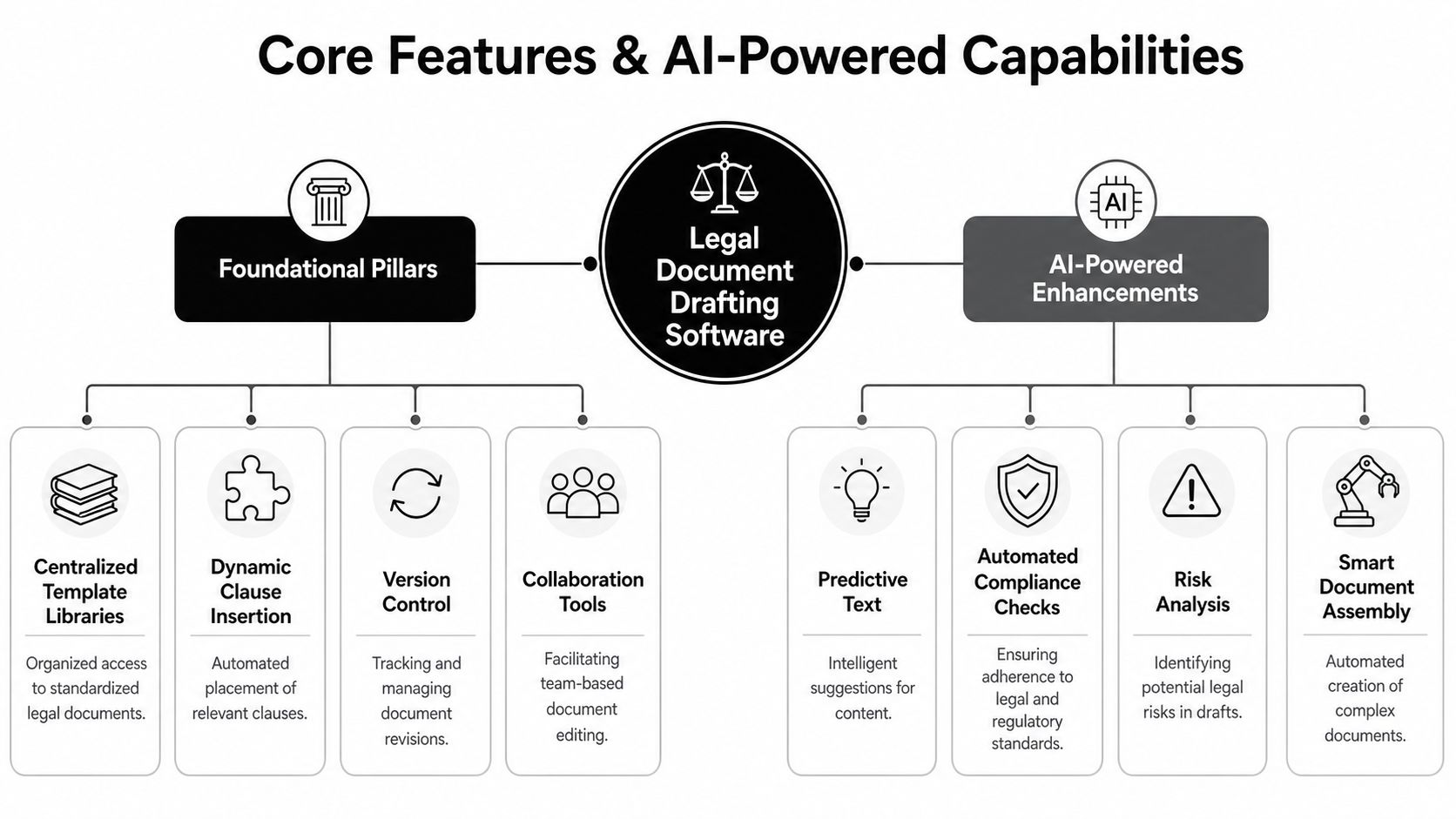
A credible platform needs a controlled drafting foundation:
- Centralized template libraries with named owners, approval history, and clear retirement rules
- Clause management that maps preferred terms, fallbacks, and business-approved deviations
- Version control that records edits, comparisons, and decision history
- Collaboration tools for comments, redlines, and approval routing across legal and business stakeholders
- Repository support that keeps drafts, signed agreements, amendments, and extracted metadata tied together
These features are not just administrative hygiene. They determine whether non-legal teams can draft safely. Without them, every self-service workflow turns into a policy exception.
What the AI layer changes
According to Thomson Reuters, legal professionals reported the highest current use of generative AI for document review, document summarization, and document drafting in its Future of Professionals report. That adoption pattern reflects where teams see immediate value. AI changes how first drafts are produced, how third-party paper is reviewed, and how much repetitive work reaches counsel.
The practical shift is straightforward. Sales should not wait on legal to assemble standard language that could be generated from approved rules. Procurement should not edit supplier agreements blind when software can flag missing indemnities, data protection gaps, or governing law mismatches before legal ever opens the file.
Useful AI capabilities usually include:
- Draft generation from plain-English or form-based inputs
- Clause suggestions tied to contract type, entity, jurisdiction, and risk policy
- Deviation detection on third-party paper
- Risk spotting during review, including missing or non-standard language
- Metadata and obligation extraction from signed agreements
- Repository-level analytics that show clause usage, renewal exposure, and negotiation trends
The operational difference between rules-based automation and AI matters here. Rules decide what should happen when inputs are known. AI helps interpret messy language, compare alternatives, and surface issues that business users may not recognize on their own.
A strong example is software that connects guided drafting to approvals, negotiation, and storage in one system. AI-powered contract drafting automation explains that model well. The draft is only useful if the process around it keeps control in place.
What works and what usually disappoints
In first-phase CLM rollouts, a few capabilities create value quickly.
Usually worth prioritizing early
- Guided first drafts for common agreements used by sales and procurement
- Clause enforcement during document assembly so users cannot improvise core risk terms
- AI review of inbound paper to triage low-risk changes and escalate real exceptions
- Approval workflows based on contract value, region, data use, or legal deviation
- Searchable contract intelligence for renewals, notice dates, and obligations after signature
Other features tend to disappoint early because they arrive before the operating model is ready.
Often overrated in the first rollout
- Highly complex template logic before legal has standardized fallback language
- AI outputs without approved playbooks, which shifts drafting risk from lawyers to business users
- Standalone drafting tools that do not connect to CRM, procurement systems, repository, or eSignature
- Generative features sold as productivity gains when no one has defined who owns review, escalation, and final approval
For founders and operational leaders comparing adjacent categories, this broader list of AI solutions for business leaders helps place legal drafting software within the broader business systems stack.
A platform such as Legitt AI fits the category many enterprises now prefer. It combines AI drafting, negotiation support, eSignatures, repository management, approvals, and contract intelligence in one workspace. For teams adopting CLM for the first time, that is often easier to govern than stitching together separate tools and hoping the handoffs hold.
AI creates the most value when it lets business teams draft within guardrails and sends legal only the exceptions that warrant legal judgment.
How Software Transforms the Contract Workflow
The easiest way to evaluate legal document drafting software is to compare the day-to-day workflow before and after adoption. Most enterprises don't need more features. They need fewer handoffs, fewer avoidable reviews, and one source of truth.
Advanced drafting software can reduce drafting time by 60–75% and reduce post-signature disputes by up to 40% by using NLP and jurisdiction-specific rule engines to generate accurate contracts from plain-English prompts, according to Definely's overview of legal drafting software.
Contract Workflow Before vs After Automation
| Lifecycle Stage | Manual Process (The 'Before') | Automated Workflow (The 'After') |
|---|---|---|
| Drafting | A user searches shared drives, copies an old agreement, and edits it manually. | A user starts from an approved template or prompt-based workflow that assembles the right draft. |
| Internal review | Drafts move through email chains, with unclear ownership and inconsistent edits. | Stakeholders review in one workspace with comments, redlines, and approval routing. |
| Negotiation | Counterparty paper is reviewed line by line with limited fallback guidance. | Non-standard terms are surfaced quickly, and legal reviews exceptions instead of every clause. |
| Execution | Teams print, sign, scan, or chase signatures across disconnected tools. | eSignature routes the agreement to the right signers with status tracking. |
| Storage | Executed contracts are saved in folders or inboxes with weak searchability. | Final versions move into a searchable repository with metadata, reminders, and linked amendments. |
| Post-signature management | Renewals, notice periods, and obligations rely on someone remembering them. | Renewal alerts, obligation tracking, and reporting create ongoing contract visibility. |
Where departments feel the change first
Sales usually notices the shift first because turnaround improves on routine customer paper. Procurement benefits next because supplier agreements stop disappearing into side processes. Legal benefits most when it no longer spends time cleaning up preventable drafting mistakes.
A strong workflow usually follows this pattern:
- Business initiates using approved request forms or templates.
- Software assembles the first draft with the correct structure.
- Approvals trigger automatically if terms fall outside policy.
- Negotiation happens in-platform rather than through uncontrolled email threads.
- Execution and storage complete the record without manual filing.
For teams still working through basic repository and file governance questions, this guide to document management for legal practices is a helpful companion resource.
Why this matters beyond legal
Contract process design affects revenue operations and vendor operations as much as legal workload.
For example:
- Sales teams need self-service document creation for low-risk paper.
- Procurement teams need standardized intake and fallback terms for suppliers.
- Finance teams need executed documents tied to pricing, notice, and renewal obligations.
- Operations teams need visibility into approvals, cycle blockers, and handoff delays.
This is why contract automation aimed at commercial teams has become so important. A focused example is contract automation for sales teams, where the gain isn't just faster drafting. It's fewer preventable escalations to legal.
Evaluating Software for Different Business Teams
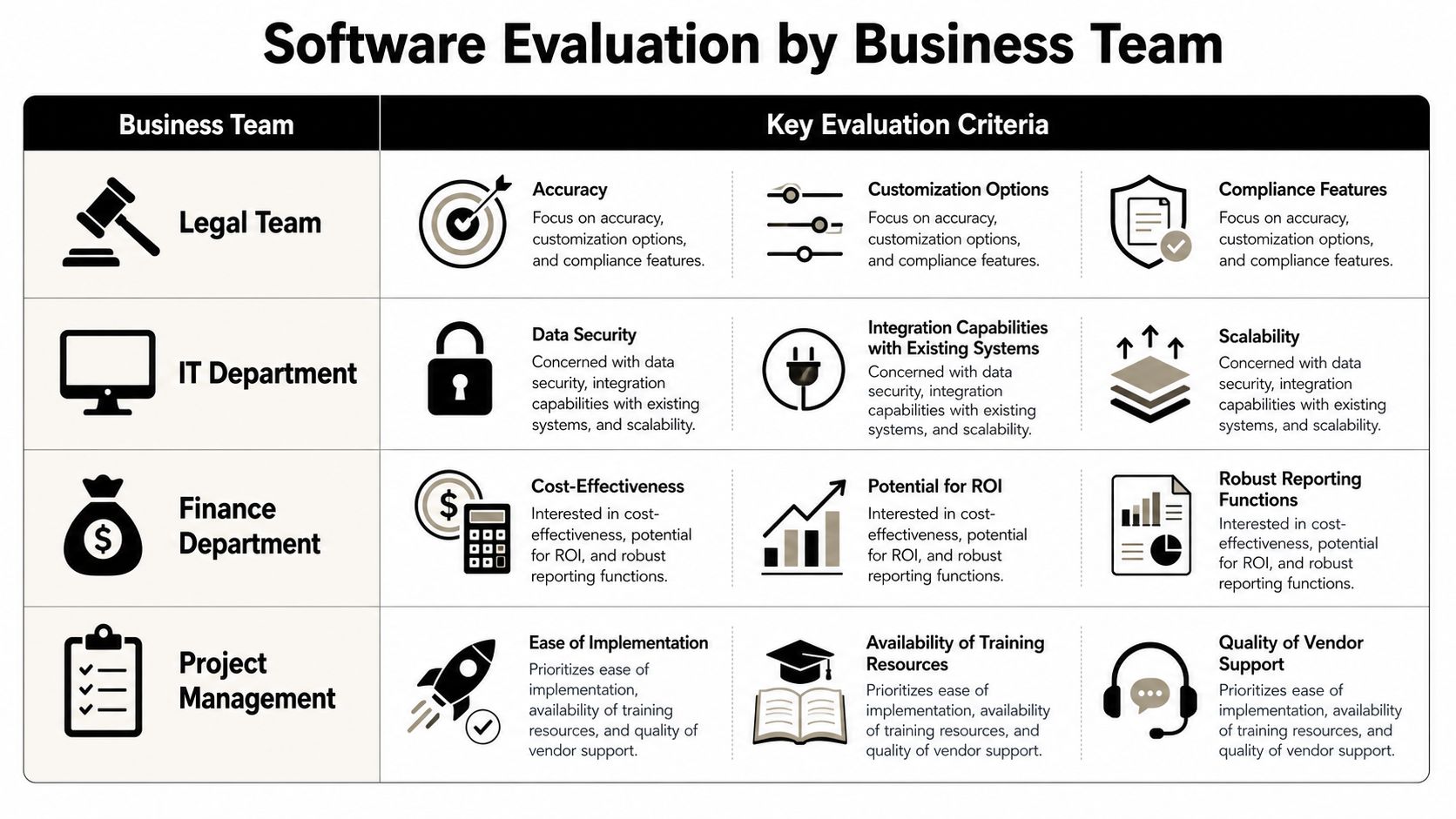
One reason CLM buying cycles stall is that each department uses different evaluation criteria but talks as if they're buying the same thing. They aren't. Legal is buying control. Sales is buying speed. Procurement is buying standardization. Finance is buying visibility after signature.
Legal needs governance, not just drafting
Legal should test whether the system can protect the organization from its own template sprawl.
Look closely at:
- Master clause library controls
- Approval rules for non-standard terms
- Redline and fallback management
- Audit trails for edits and approvals
- Jurisdiction-aware drafting safeguards
The non-lawyer access question matters here. A 2025 study found that 48% of online legal templates failed to include state-specific mandatory clauses, which is exactly why jurisdiction-aware drafting matters for business users, as noted in DocDraft's analysis of jurisdictional safety for legal drafting.
If sales or procurement can self-serve, legal's job becomes designing the guardrails, not rewriting the same document all quarter.
Sales wants speed without policy drift
Sales teams don't need unrestricted drafting freedom. They need safe self-service.
The right system for revenue teams should support:
- Approved agreement generation from CRM data
- Playbook-based approvals when a rep changes key terms
- Integrated eSignature so contracts don't stall at execution
- Status visibility so reps know what's waiting on legal, finance, or the customer
If a platform requires sales to leave the deal system, re-enter data, and wait for manual upload to signature, adoption usually slips.
Procurement and finance have different risks
Procurement often handles a high volume of third-party paper. That makes review speed and deviation analysis important, but so does supplier consistency. Procurement should test how the system handles vendor templates, fallback language, approval thresholds, and obligation capture after signature.
Finance usually gets pulled in too late. By the time finance sees the contract, pricing, billing terms, auto-renewals, notice clauses, and service obligations may already be locked in. The better systems surface those terms in a searchable way and connect them to reporting and operational follow-up.
A useful framing for cross-functional evaluation is this deep dive on how Legitt AI empowers business and revenue management teams, especially for organizations trying to let non-legal teams move faster without losing policy control.
Calculating ROI with Practical Use Cases
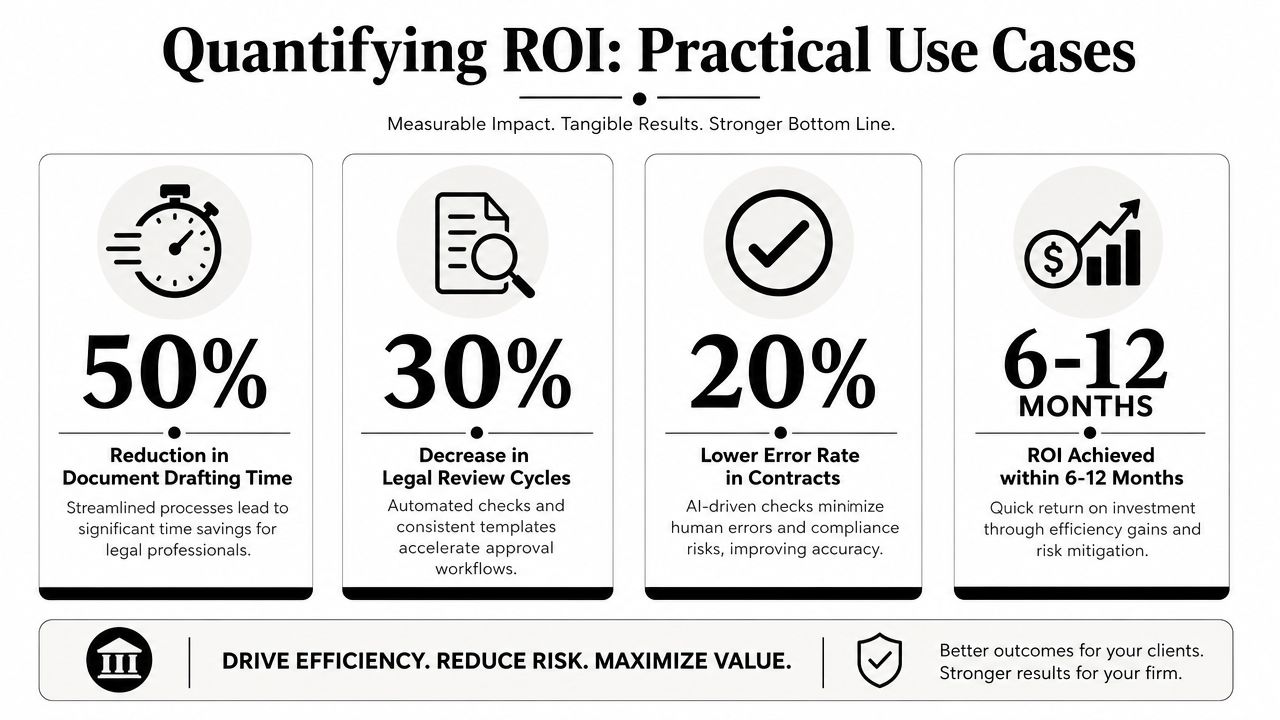
The ROI case for legal document drafting software gets stronger when you stop talking about “AI” in the abstract and start mapping value to specific contract workflows.
Use case one with inbound third-party paper
For many enterprises, the fastest ROI appears in contract review rather than drafting. Sales receives customer paper. Procurement receives supplier paper. Legal then spends time identifying where the counterparty changed core risk language.
AI-native platforms with deviation analysis reduce third-party paper review time by 70% and automatically identify 95% of non-standard risk clauses, accelerating deal closure by 30–50%, according to Avokaado's review of legal drafting software options.
That matters because inbound paper is where manual review burns hours without creating reusable value.
Use case two with standard agreements
Routine contracts are another clear ROI area.
Examples include:
- Sales agreements that should pull terms from CRM data
- NDAs that shouldn't require legal review unless terms deviate
- Procurement forms that need approved supplier positions
- Amendments and renewals that should start from the existing executed record
When software handles assembly, approval routing, and eSignature in one flow, teams remove low-value coordination work. Legal then spends time on exceptions, negotiation strategy, and higher-risk contracts.
Field observation: The biggest savings rarely come from drafting alone. They come from cutting rework, chasing approvals less often, and keeping signed documents tied to the workflow that created them.
Use case three with post-signature intelligence
A contract only creates value if the business can act on it after execution.
Contract intelligence supports ROI by helping teams:
- Track obligations so service, payment, and notice commitments don't get missed
- Monitor renewals so the business can act before lock-in dates
- Search clauses and metadata across the repository
- Surface risky language patterns across contract populations
That's where CLM becomes more than document generation. It becomes operational infrastructure.
For teams building an internal business case, this walkthrough of real-life use cases of contract review with Legitt AI is useful because it ties review and risk analysis directly to workflow outcomes.
Your Implementation and Integration Checklist
Most CLM rollouts fail for ordinary reasons. Bad template cleanup. Weak ownership. No change management. Too much ambition in phase one.
Start with the operating model
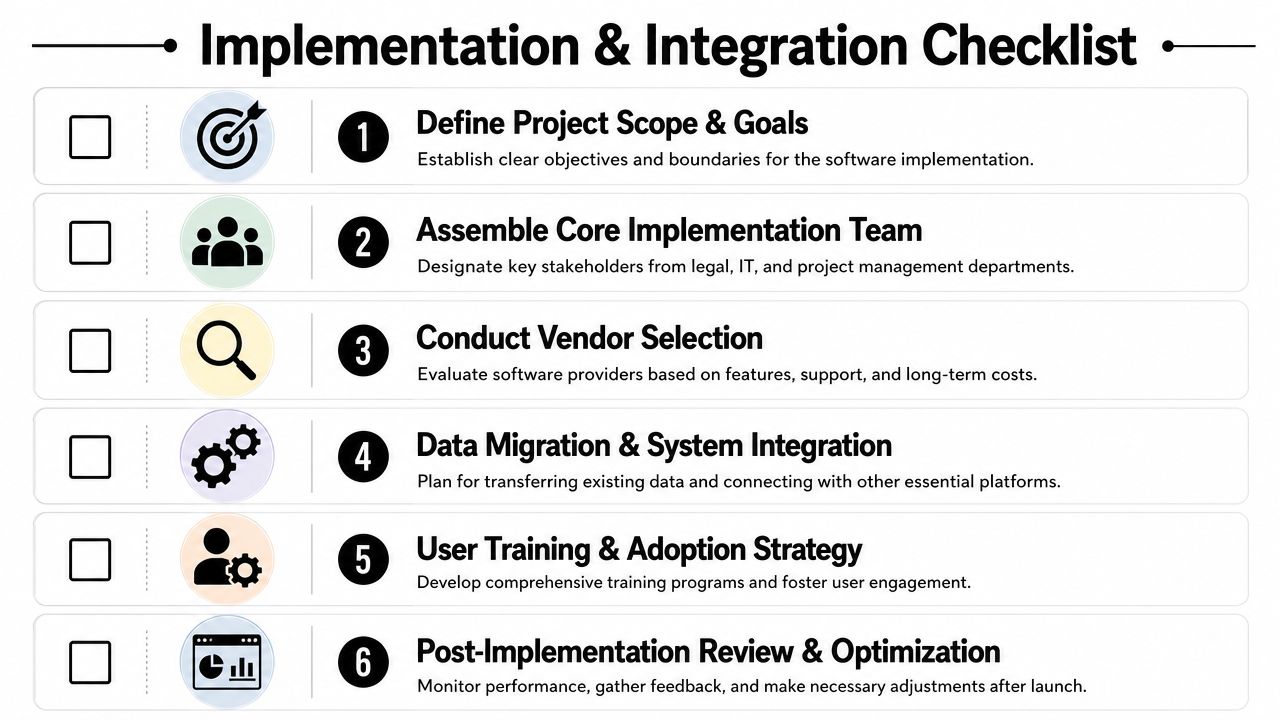
Before the vendor configuration begins, define three things clearly:
- Which contracts come first
- Who owns templates and clause governance
- What success looks like for each team
A focused phase-one scope usually works better than trying to migrate every document type at once. Standard customer agreements, NDAs, and common procurement forms are often the right starting point because they have repeat volume and clear fallback language.
Validate integrations early
The software can't sit outside the contract workflow and still deliver full value.
Check whether it integrates with:
- CRM systems such as Salesforce, HubSpot, or Microsoft Dynamics 365
- Document tools such as Microsoft 365 and Word
- Communication tools such as Slack
- eSignature workflows
- ERP or finance systems where needed for downstream visibility
- APIs or automation layers for custom routing
Security review also needs attention early. Enterprise buyers should verify items like SOC 2 Type II, ISO 27001/27701, GDPR, role-based access controls, SSO, MFA, and encryption standards if those matter in the internal review process.
Use a phased rollout
Don't train the whole company on every feature at once.
A practical rollout sequence looks like this:
- Clean templates first and remove duplicate or outdated forms.
- Build approval logic around policy exceptions.
- Pilot with one team such as sales ops or procurement.
- Train users by role rather than through generic platform demos.
- Measure friction points in real workflows and adjust.
- Expand to repository, renewals, and obligations once drafting and approvals are stable.
The best adoption plans treat legal ops, IT, sales ops, and procurement as one implementation group, not separate requestors.
Frequently Asked Questions
Is legal document drafting software the same as CLM software
Not always. Some tools only generate documents. A full Contract Lifecycle Management platform handles drafting, contract review, negotiation, approvals, eSignature, repository management, renewals, obligations tracking, and contract intelligence across the whole lifecycle.
Does this replace lawyers
No. It changes where lawyers spend time. The software is strongest on standardization, first drafts, risk flagging, routing, and post-signature visibility. Lawyers still handle judgment, negotiation strategy, complex issues, and final accountability.
What should buyers ask in a demo
Ask the vendor to show:
- How a non-legal user generates a compliant contract
- How jurisdiction-specific logic is applied
- How third-party paper is reviewed
- How approval workflows trigger
- How signed documents are stored and searched
- How renewals and obligations are tracked
What pricing model is more practical
That depends on usage patterns. Some teams prefer per-seat pricing because budgeting is simpler. Others prefer usage-based models if only a smaller group drafts high volumes. The better question is whether pricing aligns with how many business users need self-service access.
How important are integrations
They're critical. If contract requests, customer data, approvals, signature, and storage live in separate systems with manual handoffs, the process stays slow. For teams comparing broader automation ecosystems, this catalog of business tool integrations for AI is a useful reference for thinking through connectivity requirements across the stack.
How long does implementation take
It depends on template quality, integration complexity, security review, and internal ownership. Teams move faster when they start with a narrow contract set and a defined approval policy instead of trying to automate every agreement type from day one.
If you're evaluating how to bring drafting, contract review, approvals, eSignatures, repository management, and contract intelligence into one workflow, Legitt AI is worth reviewing as part of the shortlist. It's built for organizations that want business teams to move faster while legal keeps control over templates, clauses, and compliance guardrails.