You’re one email away from a yes. Pricing is settled. The customer wants a quick start. Your team is ready to begin work before the paperwork catches up.
That is how small businesses give away margin, create scope disputes, and lose control of payment terms.
A verbal agreement may get momentum, but it does not define acceptance criteria, protect intellectual property, set change-order rules, or give finance a clear path to collect. Founders who close deals consistently treat contract discipline as part of sales execution, not a legal task saved for later.
These five contracts do more than document the deal. They assign responsibility across the business. Sales gets clear guardrails on what it can promise. Operations gets defined deliverables and timelines. Finance gets billing triggers and payment terms. Leadership gets visibility into liability, renewal risk, and approval bottlenecks.
The operational payoff is speed.
With standard templates, approved clause libraries, eSignature routing, automated approvals, and a searchable repository, your team spends less time rewriting the same terms and less time hunting through inboxes for the latest version. A modern CLM platform such as Legitt AI turns that process into a system. It helps your team draft, review, negotiate, sign, store, and track obligations in one place, so contracts start working like business infrastructure instead of scattered documents.
If your NDA process is still informal, review these practical NDA drafting tips for small businesses and keep approved templates ready, including mutual and unilateral NDA forms, before live deal discussions begin.
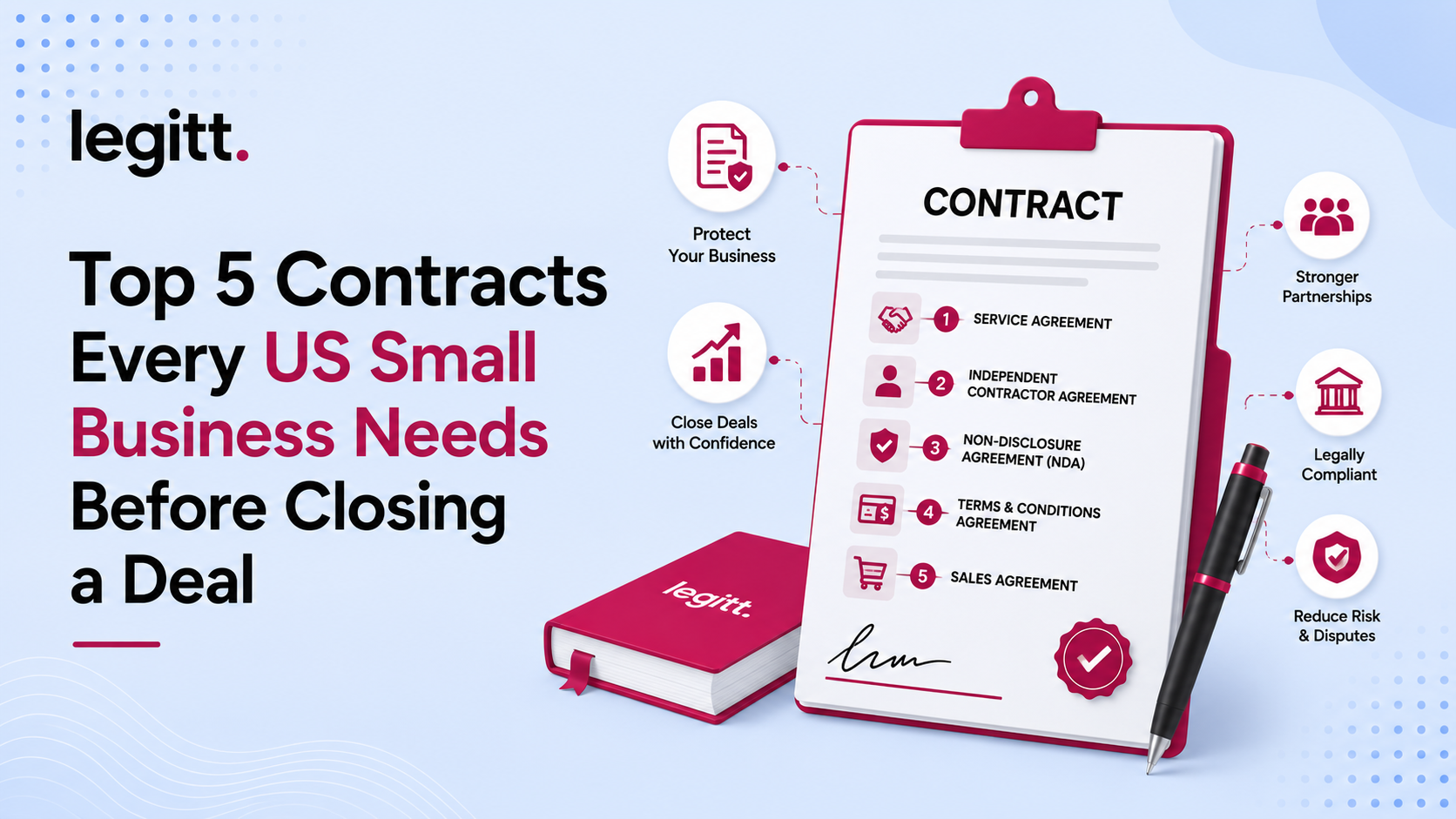
Use the five contracts below as a pre-deal system. Done well, they reduce risk, shorten review cycles, and help you close with more control.
1. Non-Disclosure Agreement (NDA)
You send a proposal, book the next call, and the buyer asks for your pricing logic, product roadmap, customer workflow, or technical approach. If the NDA is not already approved and ready to sign, the deal slows down right there. Worse, your team starts sharing sensitive information by email and call notes without clear restrictions on use.
An NDA sets the rules before real disclosure starts. Use it any time a prospect, partner, vendor, investor, or acquisition target will see information that gives your business an advantage. That includes pricing models, customer lists, source materials, product plans, process documentation, and nonpublic financial discussions.

What the NDA must do
A good NDA does four jobs. It defines the information being protected, limits how the receiving party may use it, states who can access it, and explains what happens when discussions end.
Be specific. Generic boilerplate creates room for argument. A SaaS company should name examples such as product roadmap, customer usage data, API documentation, pricing architecture, and security procedures. A manufacturer should name production methods, supplier terms, quality controls, specifications, and testing records.
You also need clean operational terms. Set the disclosure purpose. Require the receiving party to protect the information with reasonable care. Cover return or deletion of materials at the end of the discussion. Include standard exclusions for information already known, publicly available, independently developed, or received lawfully from another source.
Practical rule: Write the definition of confidential information around how your business actually creates value.
How to implement it without slowing down sales
Use two approved versions: a mutual NDA for discussions where both sides share information, and a unilateral NDA for when only your business is disclosing sensitive material. If your team needs a primer on the difference, this guide on creating an NDA effectively is a solid operational reference, and these mutual and unilateral NDA forms show the structure buyers and counterparties expect.
Then build a repeatable workflow around the document.
- Create an NDA intake rule: Sales should know which deal stages require an NDA before any sensitive file, demo detail, or pricing logic is shared.
- Approve fallback language in advance: Pre-clear edits on term length, venue, disclosure exceptions, and return or deletion obligations so routine redlines do not sit with legal for days.
- Use AI to review clauses and flag risk: A CLM system such as Legitt AI can compare incoming NDAs against your approved playbook, spot missing protections, and route only true exceptions for review.
- Track obligations after signature: Tag NDAs by counterparty, owner, and deal stage. Set reminders for expiration, termination, and destruction certification where needed.
- Connect NDA review to downstream service commitments: If your team shares service methods or support standards during pre-sales, align confidentiality review with service-level agreement and operational-level agreement decisions so contract terms stay consistent from the first conversation through delivery.
Founders derive real value from contract discipline. The NDA is not just a legal form. It is the first controlled step in your deal workflow. If it is standardized, searchable, and tied to approval rules, your team can share the right information faster and keep ownership of what makes the business different.
A practical example makes the point. A marketing agency pitching a national brand often shares campaign sequencing, channel strategy, and pricing logic before the service agreement is signed. If that material goes out without an NDA, the buyer can reuse the playbook without hiring the agency. If the NDA is signed, stored, and tracked in a CLM workflow, the agency can move quickly into discovery while keeping control over its methods.
2. Service Agreement
A client says yes on Friday. By Tuesday, your team and the buyer already disagree on what was sold, when it is due, and what happens if the work changes. That dispute starts in the contract. A service agreement prevents it.
Use this agreement for any deal where your business provides a defined service or hires another party to deliver one. It should control scope, delivery timing, customer dependencies, payment rules, acceptance, and what each side can do if performance slips. If those terms stay vague, revenue gets delayed and margin disappears.

What belongs in the core agreement
Start with the commercial terms your team manages every week. State the service description, pricing model, invoice timing, due dates, taxes, approval steps, and customer responsibilities in plain language. Then state the process for changes. If extra work, added users, rushed delivery, or revised timelines can happen, the contract needs a written change order rule.
Be specific about operational boundaries.
An IT support provider should define support hours, covered systems, response targets, escalation paths, maintenance windows, and what counts as out-of-scope work. A digital marketing agency should define deliverables, review rounds, client approval deadlines, access to ad platforms, and ownership of campaign assets. A bookkeeper should define the monthly close schedule, what records the client must provide, and what happens if data arrives late.
This is also the right place to separate one-time services from ongoing support. If you mix implementation, training, and maintenance into one blurred promise, the client will read that in the broadest possible way.
Where SLAs help and where they create risk
Service levels belong in the agreement only if your team can measure them, report them, and meet them consistently. If you promise uptime, response times, or turnaround windows without a tracking process, you create legal exposure and operational confusion.
Use a separate SLA schedule when the performance terms need more detail than the body of the agreement should carry. This breakdown of master service agreement vs statement of work and related contract structure decisions helps clarify where ongoing legal terms end and project or service details begin. This related guide on service level agreement vs operational level agreement is also useful if your team keeps mixing internal operating targets with customer-facing commitments.
Scope creep starts when change requests live in email instead of the contract workflow.
How to manage a service agreement in practice
Do not treat this as a PDF that gets signed and forgotten. Put it into a CLM workflow that your sales, delivery, finance, and legal teams all use.
- Draft from an approved template: Preload fallback language for payment timing, late fees, liability caps, IP use, and termination rights so reps do not improvise on active deals.
- Route risky edits automatically: If a counterparty changes acceptance terms, payment triggers, indemnity, or service credits, send only those exceptions for review. Standard edits should move fast.
- Create a formal change order path: New deliverables, timeline shifts, and pricing changes should be approved inside the same system before work starts.
- Track live obligations after signature: Set reminders for reporting deadlines, renewal dates, notice periods, support reviews, and any service-credit exposure.
- Connect the contract to delivery data: If your team promises response times or milestones, tie those obligations to project management or support systems so account managers can spot risk early.
AI-powered CLM proves its worth. A platform such as Legitt AI can extract service terms from signed agreements, flag missing acceptance language, compare redlines against your approved playbook, and push obligation reminders to the right owner. That turns the service agreement from a static legal file into an operating document your team can use to protect cash flow and close the next expansion faster.
A practical example shows the difference. A staffing firm sells “urgent hiring support” without defining interview scheduling, candidate replacement periods, or when placement fees are earned. The client expects full-cycle recruiting. The firm expected resume delivery and shortlist support. A clear service agreement fixes that before kickoff, and a CLM workflow makes sure any later expansion is priced, approved, and documented.
3. Master Service Agreement (MSA) with Statement of Work (SOW)
A client says yes to phase one on Friday. By Tuesday, they want phase two, a faster deadline, and a different team mix. If you handle that expansion with one recycled contract and a few email approvals, you create avoidable risk. Use an MSA to set the legal rules once, then use a separate SOW to define each project clearly.
This structure gives small businesses speed without losing control. As deals grow, buyers ask harder questions about liability, security, acceptance, compliance, and ownership. An MSA with attached SOWs lets sales close follow-on work faster because the legal foundation is already in place.
What belongs in each document
Put relationship-level terms in the MSA. That includes confidentiality, IP ownership, warranties, liability caps, dispute resolution, security commitments, termination rights, and the rules for adding future work.
Put project-level terms in the SOW. That includes scope, deliverables, milestones, timeline, pricing, staffing assumptions, customer dependencies, and acceptance criteria.
Keep that line clean. If your team mixes business terms and legal terms across both documents, disputes get harder to resolve and expansions slow down.
How to run this well
The common failure is not drafting. It is version control. Teams sign a strong MSA, then create disconnected SOWs in Word, approve changes in email, and lose track of which document governs the work.
Set up a repeatable system:
- Negotiate the MSA once, with discipline: Treat it as the operating framework for the full customer relationship, not a one-off project paper.
- Link every SOW to the right MSA: State the effective date and exact agreement name so there is no confusion about what controls.
- Write measurable acceptance criteria: Define what delivery looks like, who approves it, and how long the client has to respond.
- Set an order of precedence: If the SOW conflicts with the MSA, say which document wins.
- Manage amendments in one workflow: Scope changes, revised milestones, and pricing updates should route through the same approval path and stay attached to the parent agreement.
One rule matters more than founders expect. If your sales team can change scope without updating the SOW, your contract process is broken.
AI-powered CLM fixes the operational side of this. Legitt AI can tie each SOW to the governing MSA, standardize approved clause language, compare redlines against your fallback positions, and route exceptions to the right reviewer. It can also extract project obligations after signature so delivery, finance, and account teams know what was promised and when. If you want a clearer baseline on how the documents differ, review this guide to master service agreement vs statement of work. Teams also benefit from aligning these contract layers with their customer-facing legal stack, especially when standard website terms are involved. This breakdown of terms and conditions vs privacy policy helps clarify that boundary.
A practical example shows why this matters. A product studio signs one MSA for a year-long client relationship. It then issues separate SOWs for discovery, UX design, prototyping, and user testing. Legal reviews the core terms once. Each new project moves faster because the team only negotiates the work package, not the full legal framework again.
When a dispute starts, the first question is usually which document controls. A clean MSA and disciplined SOW process answer that before the argument gets expensive.
4. Terms and Conditions or Terms of Service
If you sell the same product or service to many customers, you need standardized terms and conditions. This is the contract layer that lets you scale without negotiating every sale by hand.
Many businesses treat terms as a website footer problem. That’s a mistake. Your terms control payment rules, renewals, acceptable use, disclaimers, liability limits, account suspension rights, and dispute procedures. If they’re unclear, your support, finance, and sales teams all inherit the mess.
Where small businesses usually get this wrong
They copy a template from a larger company that has a different business model, risk profile, and product architecture. Or they combine privacy language, product promises, and support obligations into one unreadable document.
Keep the document plain and navigable. Put the sections customers care about first. Payment, cancellation, renewal, refunds, usage restrictions, IP ownership, and limitation of liability should be easy to find on both desktop and mobile.
For businesses selling into public-sector channels or prime contractor relationships, generic website terms may not be enough. The SBA’s guidance on types of federal contracts makes clear that federal contracting has different structures, eligibility rules, and role-specific agreements than ordinary commercial sales. If you’re moving into that market, your standard commercial terms usually need additional compliance flow-downs and role-based language.
How to operationalize your terms
Present the latest version through a clear acceptance flow. For a SaaS product, that usually means clickwrap during sign-up or renewal. For a service sold online, that can mean acceptance during checkout or order submission.
Separate your privacy policy from your contract terms. They work together, but they don’t do the same job. This guide on terms and conditions vs privacy policy is a good reference for teams that blur the line.
- Use affirmative acceptance: Require users to actively agree.
- Maintain version history: Store prior versions and effective dates in your repository.
- Review annually: Update terms when your pricing, product, or operating model changes.
- Coordinate across teams: Legal drafts the rules, but product, billing, support, and security need to validate them.
A simple example. An e-commerce business offers custom goods but its terms don’t clearly address cancellations after production starts. Customer support improvises exceptions, finance absorbs refund disputes, and margins suffer. Clear terms fix that before the first chargeback argument.
5. Independent Contractor or Freelancer Agreement
Small businesses often close deals only because flexible talent helps them deliver. Designers, developers, marketers, consultants, contract attorneys, recruiters, and specialists can expand capacity fast. But if you hire them without a proper agreement, you create risk on ownership, confidentiality, payment, and worker classification.
This contract should state that the contractor is independent, define the work, set payment rules, assign ownership of deliverables where needed, and require return or deletion of company materials at the end of the engagement.
What the agreement should lock down
Start with scope. If the contractor will work on multiple projects, tie each engagement to a written work order or project brief. Then cover deadlines, fee structure, invoice timing, approval process, confidentiality, IP assignment, and termination rights.
Ownership language matters. If a freelance developer builds customer-facing code or a designer creates brand assets, your business needs clear rights to use and control that work after payment. Don’t assume an invoice transfers IP.
The relationship language matters too. The contract should reflect an independent business relationship, not an employee relationship in disguise. That includes how the contractor controls work methods, tools, and schedule.
How to manage contractor agreements at scale
Small teams usually make the same operational mistake. They sign the first contractor agreement, then keep reusing it through email with no tracking of amendments, scopes, or renewal dates.
Fix that with a repeatable workflow. Use an approved template, attach project details, send for eSignature, and store the executed version in the same repository as the related NDA, SOW, or customer file. If your team often mixes employee and contractor forms, this article on employment agreement vs independent contractor agreement helps clarify the boundary. Finance teams should also standardize how to handle contractor payments so the contract and payables process align.
A contractor agreement shouldn’t only say what the freelancer must deliver. It should also say what your business must approve, provide, and pay, and when.
Use this checklist in your process:
- Confirm business terms early: Rate, milestones, expenses, and ownership should be agreed before work begins.
- Add confidentiality by reference or attachment: Don’t rely on verbal expectations.
- Tie every change to written approval: Expanded scope should trigger updated fees or timing.
- Archive final deliverables with the contract record: That makes handoff and audit easier later.
A common scenario. A startup hires a freelance product designer to create app screens before a fundraising push. Without clear IP assignment and confidentiality terms, the startup may pay for work it doesn’t fully control.
Top 5 Pre-Deal Contracts Comparison
| Contract Type | Implementation Complexity (🔄) | Resource Requirements (⚡) | Expected Outcomes & Impact (⭐📊) | Ideal Use Cases (💡) | Key Advantages (⭐) |
|---|---|---|---|---|---|
| Non-Disclosure Agreement (NDA) | Low–Medium 🔄, simple template; negotiation may add time | Low ⚡, basic legal review and signer parties | High ⭐📊, protects confidential info; creates legal recourse; enforceability varies by jurisdiction | Early-stage talks, investor diligence, vendor or partner disclosures | Fast to execute; inexpensive; deters misuse; sets clear confidentiality rules |
| Service Agreement / SLA | Medium–High 🔄, detailed scope and measurable SLAs required | Moderate–High ⚡, legal, operations, and technical input to define metrics | High ⭐📊, clarifies deliverables, performance standards, payment terms; reduces disputes | Ongoing vendor services, SaaS uptime guarantees, IT support contracts | Establishes accountability with measurable KPIs; prevents scope creep |
| Master Service Agreement (MSA) + SOW | High 🔄, significant upfront MSA negotiation; SOWs simpler | High ⚡, legal, finance, and project management for MSA and multiple SOWs | High ⭐📊, scalable engagements; reduces repeated legal negotiation; clearer project delivery | Agencies, consultancies, repeat-project vendors, long-term vendor relationships | Standardizes core terms; speeds onboarding of future projects; lowers long‑term legal costs |
| Terms & Conditions / ToS | Medium 🔄, templateable but requires regulatory tailoring and updates | Moderate ⚡, legal, product, and compliance involvement; ongoing maintenance | High ⭐📊, binds broad user base; limits liability; supports compliance (privacy, refunds) | E‑commerce stores, SaaS platforms, mobile apps, marketplaces | Scales contractual protection to many users; sets usage and payment policies |
| Independent Contractor / Freelancer Agreement | Medium 🔄, must address classification, IP, and control factors | Moderate ⚡, legal and HR/finance to ensure compliance and documentation | High ⭐📊, clarifies relationship, assigns IP, reduces employment risk if done correctly; misclassification risk remains | Hiring freelance designers, developers, consultants, short‑term project talent | Flexibility and cost savings vs. employees; clear IP and payment terms when properly documented |
Turn Contracts into Your Competitive Advantage
A founder sends the proposal, the customer says yes, and the deal stalls because no one can find the latest paper, approvals are stuck in email, and legal terms were copied from an old contract that does not fit the work. That is how small businesses lose speed, margin, and trust.
The five contracts in this guide matter because they set the rules before money, work, and liability start moving. But templates alone do not solve the problem. Contract performance depends on how your team creates, reviews, approves, signs, stores, and monitors each agreement after signature.
Start with a system. Put your NDA, service agreement, MSA with SOW, Terms and Conditions or Terms of Service, and contractor agreement into approved templates with clause fallbacks and clear approval paths. Store executed versions, amendments, and renewals in one searchable repository. Track notice periods, payment triggers, renewal dates, termination rights, and delivery obligations so the contract keeps working after it is signed.
That discipline makes you easier to buy from.
Customers, procurement teams, and larger partners want suppliers that can send clean paper fast, explain exceptions, capture signatures correctly, and produce records without a scramble. A scattered process signals risk. A controlled CLM workflow signals operational maturity.
Legitt AI helps teams run that workflow in one place. Your team can generate contracts from approved templates, review third party paper, manage redlines, route approvals by role, collect eSignatures, store every version, and track renewals and obligations without switching between disconnected tools. That shortens contract cycles and gives sales, finance, legal, and operations a shared view of what the business agreed to.
The bigger payoff is management visibility. Once contracts are centralized and searchable, you can spot which clauses slow deals, which customers demand recurring exceptions, which vendors create renewal exposure, and which obligations are coming due. That lets you tighten templates, improve negotiation strategy, forecast revenue more accurately, and prevent avoidable disputes.
Take the direct approach. Build the contract foundation before a late payment, missed renewal, IP dispute, or contractor classification issue forces the change. Standardize the five core agreements. Add AI-assisted review and approval workflows. Treat signed contracts as operating documents, not archived PDFs.
Businesses that do this close faster and get fewer surprises.