A vendor needs more time. A customer wants to change pricing. Procurement adds a security review requirement after signature. Sales says, “We already agreed by email.” That's usually the moment when teams go looking for an amendment of agreement template.
The template matters, but it's only one part of the job. The bigger challenge is operational. Someone has to confirm whether the change should be an amendment or an addendum, draft language that accurately maps to the original contract, route approvals, collect signatures, update the repository, and make sure the business follows the new terms. If any of that breaks, the legal document can be clean while the business process still fails.
That's why strong amendment management sits at the intersection of legal drafting, contract lifecycle management, contract review, eSignature, and legal operations. The goal isn't just to create a document. It's to create a controlled change that the business can execute.
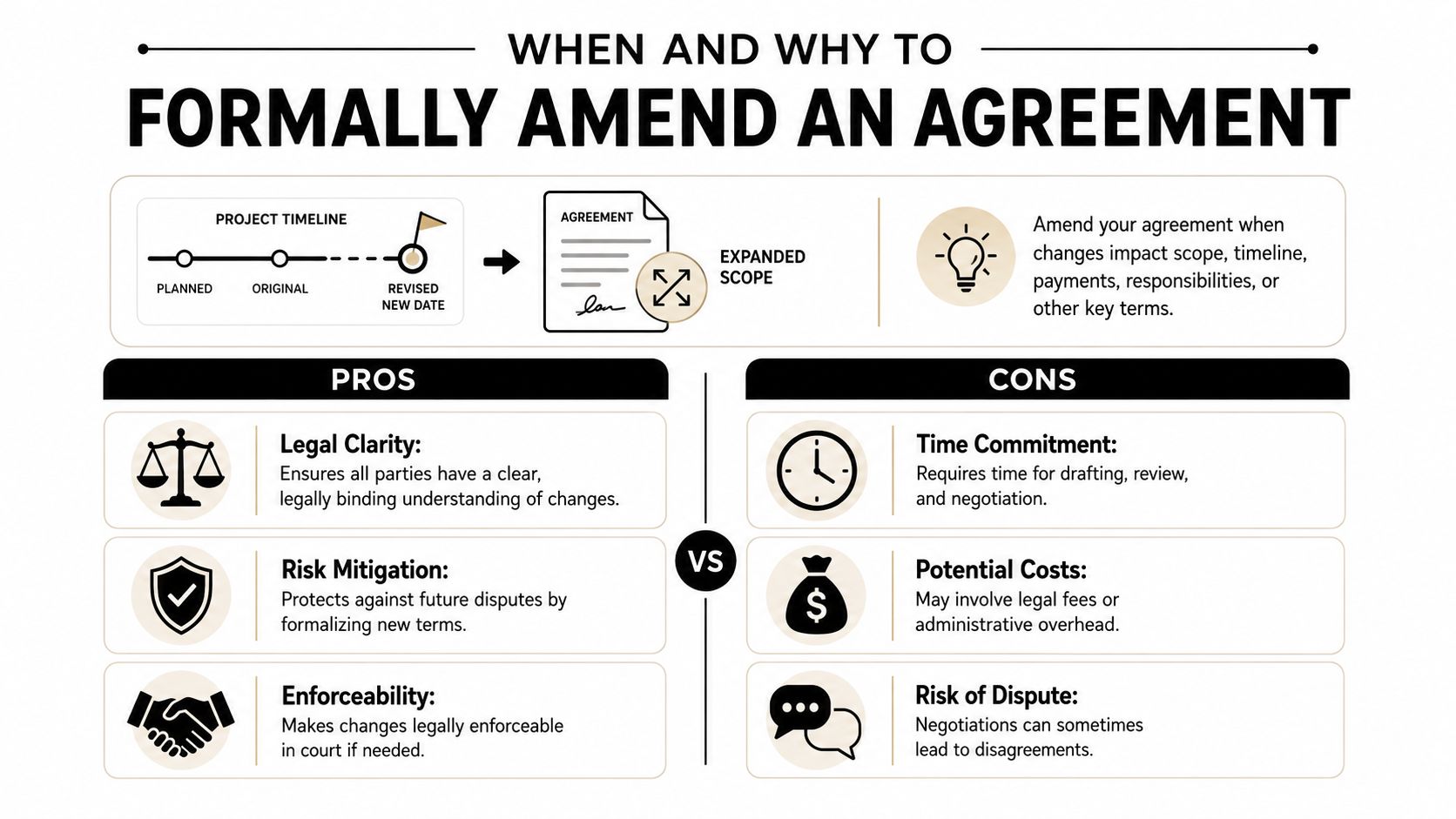
When and Why to Formally Amend an Agreement
A contract usually needs changing for ordinary business reasons. Deliverables expand. Dates slip. A new stakeholder takes on obligations. Payment timing no longer fits the original commercial deal. Those changes may feel operational, but once the agreement is signed, they become legal changes too.
A lot of avoidable risk starts when teams treat those changes casually. An email thread may show intent, but it often doesn't track the original agreement's amendment rules, define exactly what text is changing, or create a clean record for future enforcement. That creates trouble later when finance, operations, or a counterparty reads the contract differently.
Amendment versus addendum
The first question is simple. Has the original contract already been fully executed? If yes, you're usually dealing with an amendment. If not, you may be dealing with an addendum.
The University of Texas Business Contracts guidance states that an “ADDENDUM” is for unexecuted agreements while an “AMENDMENT” is required for changes to a “fully executed agreement.” That distinction gets missed constantly on generic template sites, and it's one of the fastest ways to create a document that looks formal but doesn't match the contract's legal posture. If you want a practical comparison, this breakdown on addendum vs amendment is a useful starting point.
What works and what doesn't
Here's the practical divide.
- What works: A written amendment that identifies the parent agreement, states exactly what changes, confirms who agrees, and gets signed by the right parties.
- What doesn't: Side emails, tracked changes with no final execution, or a “we'll sort it out later” approach after performance has already shifted.
Practical rule: If the original contract governs money, scope, timing, compliance, or liability, any change to those points should be documented with the same discipline as the original signature.
Why operations teams should care
A formal amendment isn't just for legal hygiene. It affects revenue timing, vendor performance, procurement controls, and reporting accuracy. If the amendment changes milestones or commercial terms, finance and operations need the updated contract data in their operational system.
That's where modern CLM software becomes valuable. It helps teams manage the change as a workflow instead of a loose document exercise. Legal can control language. Business teams can see status. Procurement can verify approvals. Everyone works from the same current version.
The Anatomy of a Bulletproof Amendment Template
Teams often asking for an amendment of agreement template don't need ornate legal prose. They need a clean document that anchors the change to the original contract and limits unintended edits. A strong template does exactly that.
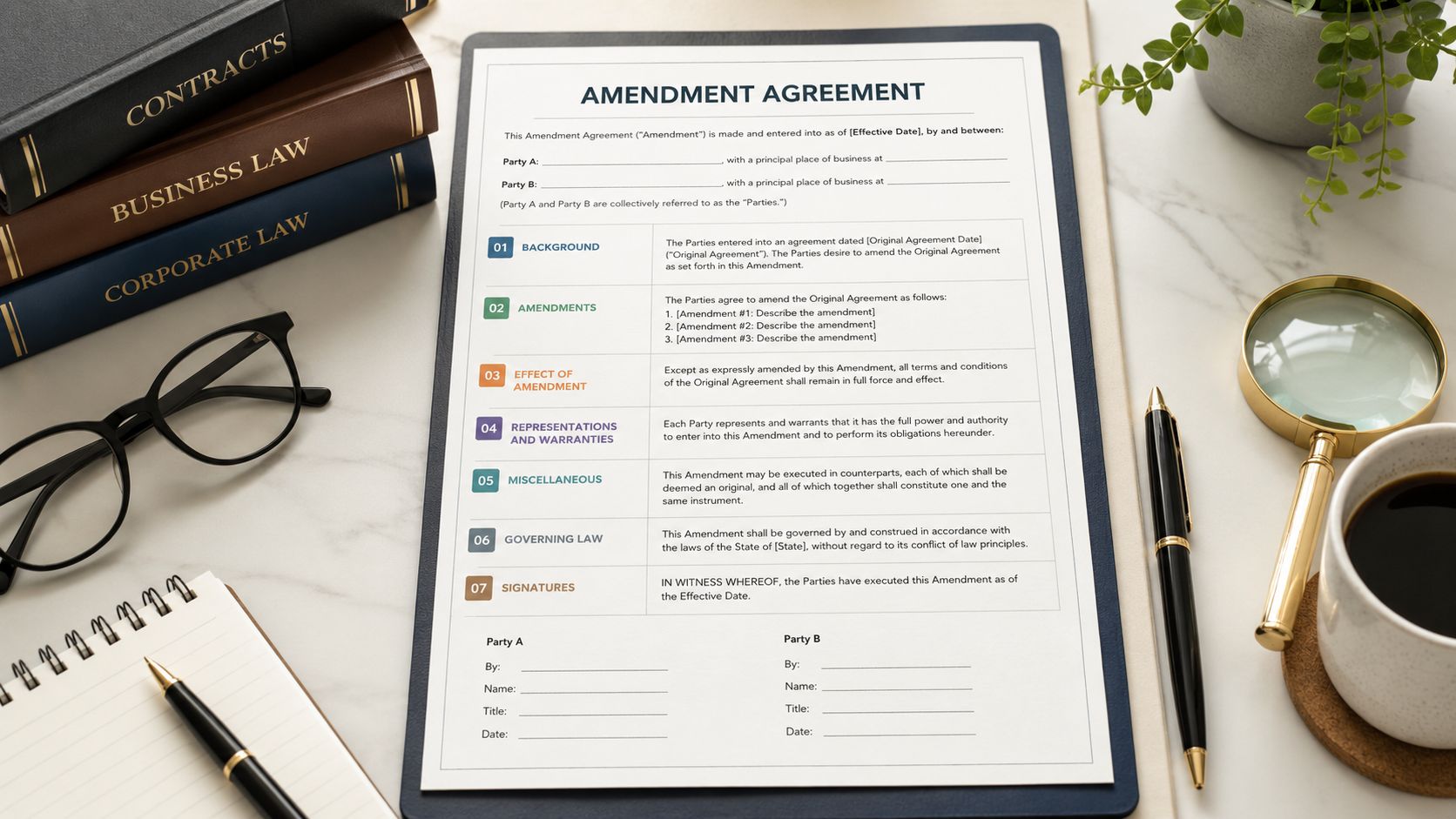
A practical amendment template
Use this structure as a working model:
Amendment No. [X] to [Original Agreement Title]
This Amendment No. [X] to the [Original Agreement Title] is entered into as of [Effective Date of Amendment] by and between [Party A legal name] and [Party B legal name].Recitals
Where, the parties entered into that certain [Original Agreement Title] effective as of [Original Agreement Effective Date] (the “Agreement”).
Where, the parties wish to amend the Agreement as set forth below.Amendments
- Section [number/title] of the Agreement is deleted in its entirety and replaced with the following: “[new text]”
- Section [number/title] is amended by adding the following sentence at the end: “[new text]”
- The term of the Agreement is revised as follows: “[new date or milestone language]”
Ratification
Except as expressly amended by this Amendment, the Agreement remains in full force and effect.Signatures
[Party A signature block]
[Party B signature block]
Clauses that can't be vague
The Nolo amendment guidance is directionally right on the essentials. The amendment should include the original agreement's effective date and title, and it should also state a new effective date of the amendment so everyone knows when the revised terms start to apply. It also recommends a concluding statement that, “other than the amendment, the contract remains as it's written.” That clause matters because it narrows the change and reduces the chance that someone later argues broader provisions were modified by implication.
Key drafting points:
- Identify the parent contract clearly: Use the exact agreement title and original effective date.
- State the amendment's own effective date: This avoids disputes about when new pricing, scope, or timing starts.
- Amend by section, not by summary: Replace or revise specific clauses. Don't write “payment terms are updated” and hope everyone infers the same result.
- Preserve the rest of the deal: Keep the ratification language tight and explicit.
- Use complete signature blocks: Printed names and titles help later when someone checks authority.
Redline example for clarity
A short before-and-after table is often enough to avoid confusion during negotiation.
| Clause area | Before | After |
|---|---|---|
| Payment timing | “Customer will pay invoices within 30 days.” | “Customer will pay invoices within 45 days.” |
That kind of drafting is better than a narrative sentence saying payment terms “will be adjusted accordingly.” Precision wins.
Where templates help and where they fail
Templates are efficient when the change is straightforward and the original agreement is structurally sound. They fail when users don't understand the underlying contract or copy language from the wrong deal type. That's why business users should treat templates as controlled starting points, not self-executing legal answers.
For teams dealing with lease-related changes, a specialized operational reference like VerticalRent's landlord's guide to lease extensions can also be useful because extension documents often carry business process issues that a generic commercial amendment template won't address.
A template should reduce drafting time, not reduce thinking.
If your organization is debating when to start from a standard form and when to escalate to bespoke language, this comparison of contract templates vs custom contracts is worth reading.
Drafting and Negotiating the Amendment
Drafting amendments goes wrong less from bad intentions than from rushed process. The contract owner knows what the business wants changed, but not always what the original agreement permits. Procurement wants speed. Sales wants the customer to stop asking. Legal gets pulled in after the commercial promise has already been made.
The fix is workflow discipline.
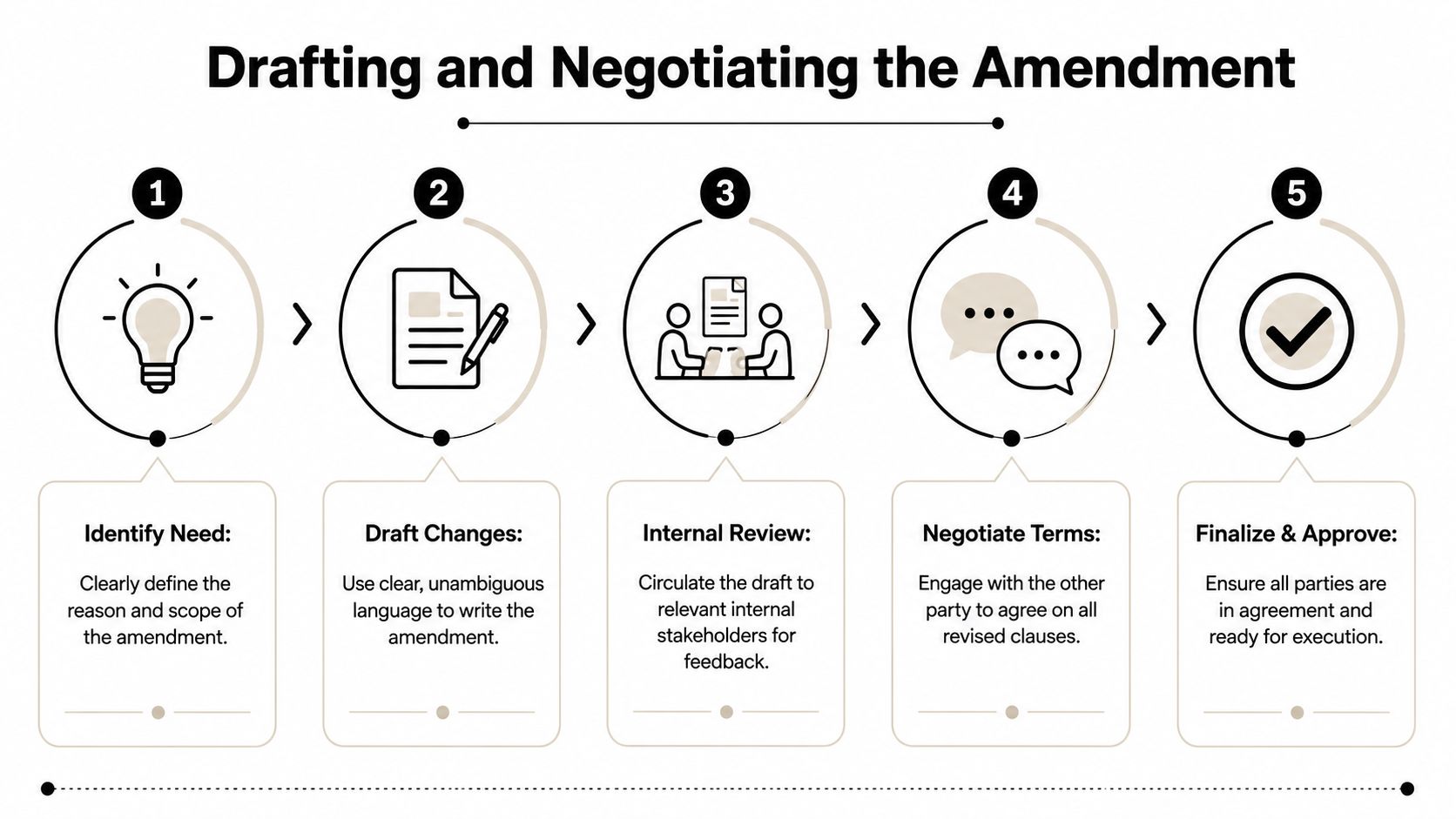
A seven-phase workflow that holds up
The Contract Nerds best-practices framework lays out seven phases for amending agreements, and it flags the most common failure clearly. Teams skip reviewing the original contract's amendment rules. That failure contributes to unenforceable modifications in over 30% of complex commercial disputes.
Use the workflow in this order:
- Define the business change. Write down what is changing and why. Scope, price, term, service levels, deliverables, or parties.
- Check the original agreement. Look for amendment formalities, notice rules, approval requirements, and any limits on assignment, pricing, or scope changes.
- Draft section-specific edits. Replace or revise exact clauses. Don't rely on broad descriptions.
- Get internal alignment. Legal, finance, procurement, security, and the business owner should confirm the impact before paper goes out.
- Control versions. Use naming conventions such as Amendment No. 1 and keep a change log.
- Negotiate against one live draft. Don't let parallel email attachments become competing truth sets.
- Communicate post-signature impacts. The operational teams need to know what changed.
The negotiation bottlenecks to watch
The hardest part usually isn't writing the first draft. It's keeping everyone aligned while the draft changes hands.
A few habits help:
- Use one owner: Someone should own the current draft and decision log.
- Comment by issue type: Separate commercial asks from legal risk points.
- Escalate only real deviations: Not every wording preference deserves executive time.
- Document approvals before signature routing: Late internal objections create preventable churn.
If you can't explain the amendment in one paragraph to finance and one paragraph to the counterparty, the draft probably still needs work.
Email is the worst place to run this process at scale. It fragments comments, hides version history, and makes approval evidence hard to reconstruct. CLM platforms solve that by keeping redlines, comments, approvals, and draft history in a single workspace. Teams that want a more detailed operational playbook can use this guide on how to handle contract amendments.
Executing Amendments with Secure Approval Workflows
A well-drafted amendment still isn't effective until the right people approve and sign it. Many companies lose control at this stage. The draft is done, then someone emails a PDF to the wrong signer, forgets finance review on a pricing change, or sends out a signature packet that doesn't reflect the final negotiated version.
That isn't a drafting problem. It's an execution problem.
Approval routing should match the type of change
Different amendments need different internal reviewers. A term extension may need business-owner confirmation. A revised fee schedule may require finance. A data-processing change may need security or privacy. A scope increase may require delivery leadership.
That routing logic shouldn't live in someone's memory. It should be embedded in the workflow.
A reliable approval sequence usually includes:
- Business owner review: Confirms the deal still matches operational reality.
- Finance signoff: Validates pricing, billing, credits, and budget impact.
- Legal approval: Checks enforceability, consistency with the parent agreement, and authority.
- Executive or delegated approver: Required where policy thresholds apply.
- External signature routing: Sent only after internal approvals are complete.
Third-party signer problems are more common than teams expect
The generic two-signature template often fails when an amendment introduces obligations for a new participant. The HUD Exchange amendment template guidance is clear on this point. If an amendment adds duties to a party who did not sign the original agreement, a new signature line must be added for that party.
That's a small drafting detail with big consequences. If the new party never signs, the business may think obligations were added when they weren't effectively accepted.
Why automated execution beats signature chasing
Manual signature collection creates three recurring problems:
| Manual process problem | Operational impact |
|---|---|
| Wrong version sent | Parties sign stale language |
| Missing approver | Internal policy breach |
| Incomplete signature block | Execution challenge later |
An integrated CLM and eSignature workflow fixes those issues by controlling the packet, the order of signers, and the audit trail. Legal operations teams also get visibility into who's holding the document and what's still pending, instead of asking for status updates in chat and email.
For organizations formalizing this process, a workflow reference like approval and signatory workflows is useful because it maps contract governance to actual routing behavior.
Post-Execution Management and Contract Intelligence
Signing the amendment isn't the end of the work. It's the point where operational follow-through becomes measurable. If the executed amendment gets dropped into a shared folder with no metadata update, the organization now has two contract states and no reliable way to know which one governs.
That's how teams miss revised renewal dates, invoice against old pricing, or staff against obsolete timelines.
The file is not the system of record
A signed PDF is evidence. It isn't a management process.
Once an amendment is executed, the team should immediately:
- Link it to the parent agreement in the contract repository.
- Update key metadata such as term, notice dates, pricing fields, and responsible owner.
- Notify impacted teams including finance, procurement, sales operations, and delivery.
- Set alerts for any revised milestone, expiration, or obligation.
A real-world example shows why this matters. In Washington State contract amendment C2100076, the agreement's expiration moved from June 30, 2022 to November 30, 2024, which the amendment documents as a 17-month extension to address an administrative delay, according to the Washington State amendment document. That's not just a date edit. It affects contract closure timing, compliance tracking, and resource planning across the extended period.
Contract intelligence is what turns amendments into action
AI contract management proves useful. The value isn't in flashy drafting claims. It's in extracting the changed terms after signature and pushing them into business workflows people already rely on.
For example, if your team receives amended terms in different source formats and needs clean archival copies, document conversion workflows like transformy.io Aspose integration solutions can support the downstream recordkeeping side of the process.
The risk after execution isn't usually that nobody signed. It's that nobody updated the business to act on what was signed.
A mature CLM repository should surface parent-child contract relationships, version history, and upcoming deadlines. Post-signature discipline is what makes the amendment usable. If you're tightening that phase, this guide on post-signing contract management is a solid operational reference.
Frequently Asked Questions about Contract Amendments
Can we just approve the change by email if both sides agree
Usually, that's the wrong default. Use email to confirm commercial intent, then convert the change into a formal amendment that follows the parent agreement's rules. If the original contract requires written amendments signed by both parties, an email exchange may not satisfy that standard.
Do this instead:
- Check the contract first: Confirm what the amendment clause requires.
- Draft the exact change: Don't rely on shorthand descriptions in an email chain.
- Get formal signatures: Preserve a clear execution record.
How many amendment versions should we allow during negotiation
As many as needed, but only one should be active at a time. Version sprawl is an operational problem, not a legal inevitability. The answer is disciplined naming, controlled ownership, and a single collaboration environment for redlines and approvals.
The efficiency upside is real. Tracking Contracts reports that contract automation cuts negotiation cycles by 50%, and that AI reviews a standard NDA in 26 seconds compared to 92 minutes for a human lawyer. Amendment workflows benefit from the same principle. Faster review and cleaner version control reduce delay without reducing oversight.
What if the amendment changes obligations for someone who wasn't part of the original deal
Don't assume the original signers can bind that new party through amendment language alone. If the amendment imposes duties on a non-original party, the signature structure must reflect that. In practice, that means legal should revise the execution block and confirm authority before routing.
Do this, not that:
- Do add the new signer: Make the party sign where the amendment adds obligations.
- Don't keep the old signature page untouched: Static templates miss dynamic liability changes.
- Do notify operations teams: A newly obligated party often changes implementation and reporting.
A good amendment of agreement template creates legal clarity. A good amendment process creates business clarity too.
If your team wants to move from ad hoc amendments to a controlled contract workflow, Legitt AI provides an AI-native CLM workspace for drafting, redlining, approvals, eSignatures, repository management, obligation tracking, renewals, and contract intelligence in one place. It's a practical fit for legal, procurement, sales, and operations teams that need contract changes to be fast, traceable, and enforceable.