A sales rep is waiting on a customer signature, procurement is hunting through email threads for the latest redline, and legal is holding the final version because one approver missed the attachment. The contract itself is ready, but the process around it keeps slipping. That's the core problem an electronic signature workflow solves, not just the act of signing, but the chain of review, approval, identity checks, delivery, and storage that gets a document across the finish line.
The shift is no longer niche. Industry estimates put the global eSignature market at USD 12.22 billion in 2025, with a projected 39.3% CAGR from 2025 to 2034 and a forecast value of USD 238.42 billion by 2034. Adoption is already broad, with 60% to 80% of organizations across industries using some level of eSignature technology and 95% of businesses either using or planning to use it, according to Certinal's 2025 eSignature statistics summary. For enterprise teams, that means the question isn't whether to digitize signatures. It's how to design the workflow so deals move faster without weakening compliance.
Introduction to Electronic Signature Workflows
A wet signature process looks simple until a contract gets stuck. The rep sends a PDF, the customer prints it, someone signs the wrong copy, and the whole thread turns into a scavenger hunt for the latest version. Legal then has to confirm what was signed, who saw it, and whether the record is complete.
An electronic signature workflow replaces that chaos with a controlled sequence. The document moves from draft to review, from approval to signature, and from execution to storage without relying on memory or inbox archaeology. That matters because the workflow is where delay usually hides, not in the signature itself.
Practical rule: If a team cannot answer who touched the document, what version they signed, and where the executed copy lives, the process is still manual even if the signature is digital.
This is why adoption keeps expanding across sales, procurement, legal operations, and finance. Teams want less waiting, fewer handoffs, and a clearer record of consent. They also want a process that works for straightforward NDAs and more sensitive agreements without turning every document into a security checkpoint.
The rest of the guide breaks down how to build that balance. You'll see how to think about the workflow as a business process, where AI-powered contract management tools fit, and why the right level of control depends on the document, the counterparty, and the jurisdiction.
Understanding the Key Components
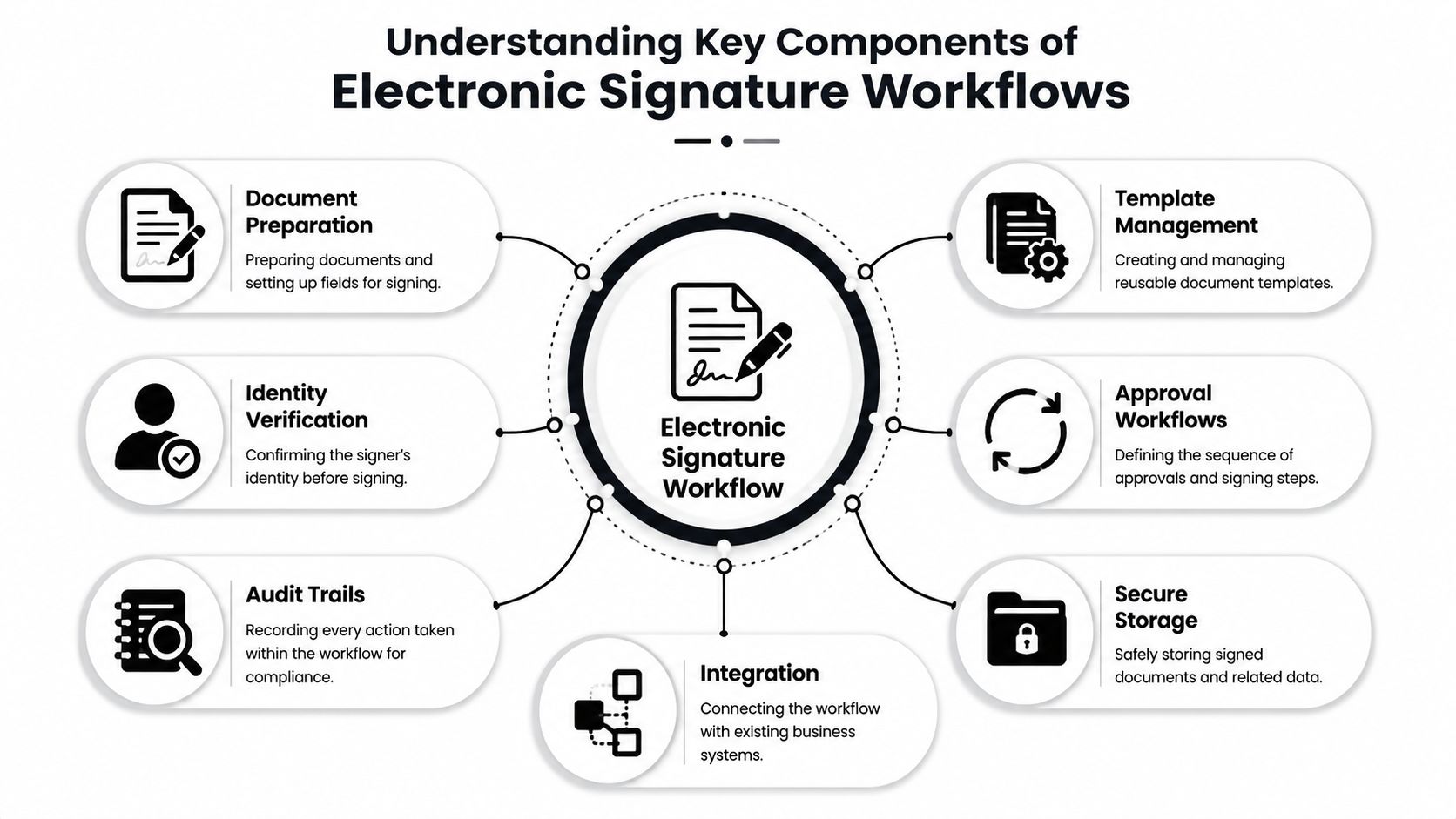
Think of the workflow like a secure mailroom. The envelope has to be prepared, routed, checked, signed, logged, and archived before anyone can trust what's inside. If one step is weak, the business record becomes less reliable.
The core building blocks
Document preparation involves shaping the contract for signing. Templates, fields, party names, dates, and clauses need to be ready before the packet goes out. In CLM software, drafting and version control during this phase prevent people from signing an old file by mistake.
Identity verification proves the signer is the right person for the job. OneSpan's guidance frames enforceability as an end-to-end chain, because a weak point anywhere can damage the evidence needed to show who signed, what they saw, and when they agreed. That's why Legitt AI's identity verification overview is a useful reference when legal and operations teams are deciding how much assurance a workflow needs.
Routing and approval rules decide who sees the document first, second, and last. A sales contract might need finance approval before the customer sees it, while a vendor onboarding packet may need procurement first and legal only for exceptions. This is the same logic that makes contract automation useful in enterprise workflows.
What happens after the signature
Consent capture records the signer's intent. That's the legal bridge between a click and an enforceable event. Audit logging records the path the document took, while tamper-evident sealing helps preserve the chain of custody after execution, which is critical for repository management and contract intelligence later on.
Secure delivery and archiving close the loop. The executed copy needs to reach the right people and then live in a searchable repository, not in someone's desktop folder. That final storage layer matters because renewal tracking, obligation tracking, and contract analytics only work when the signed version is easy to find and trust.
The best workflow doesn't just collect signatures. It preserves proof.
Mapping a Typical Electronic Signature Workflow
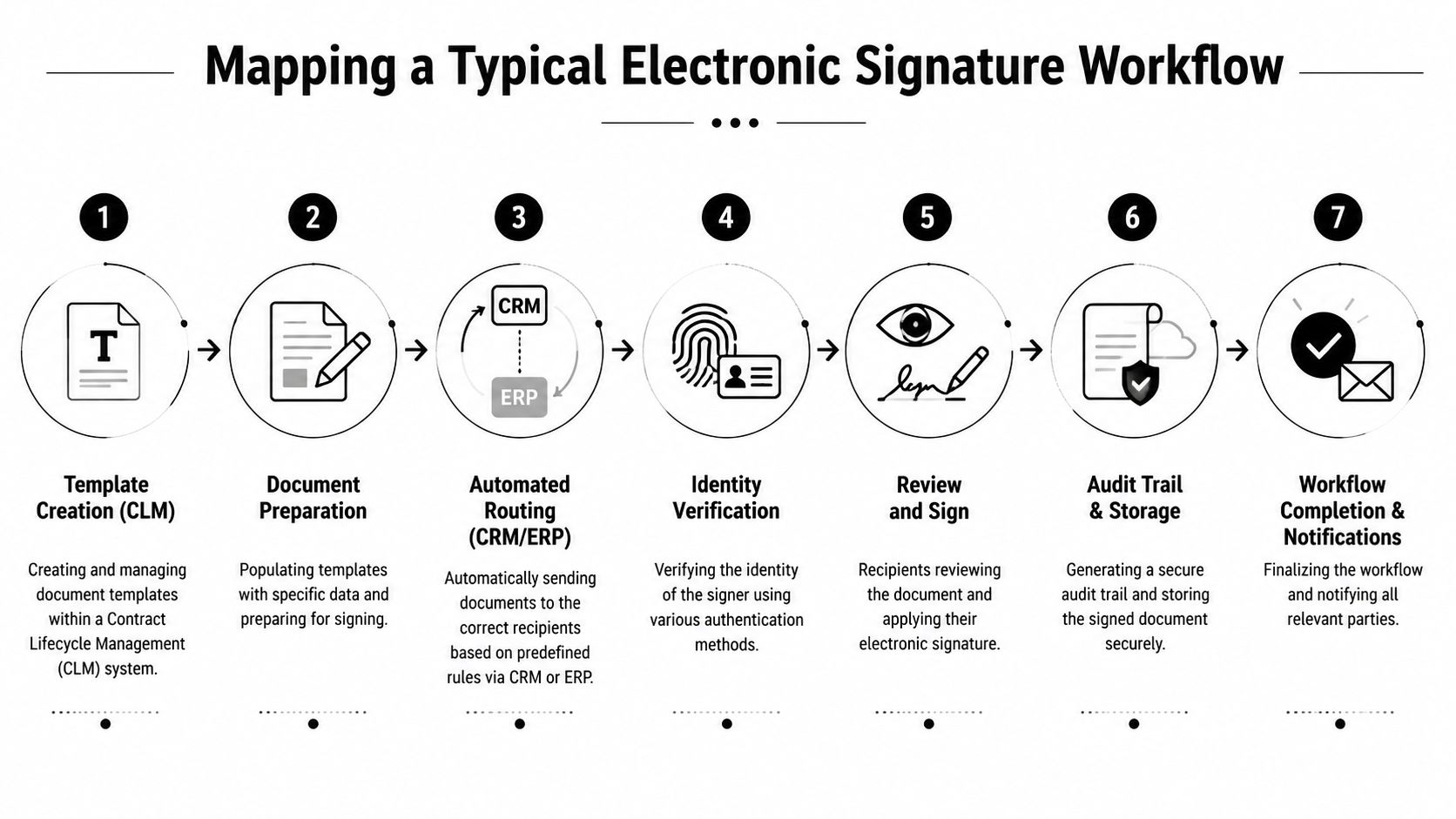
A useful workflow behaves like a relay race. Each team member hands off the same packet, but the packet changes state as it moves from draft to executed agreement. The trick is to make each handoff visible.
Step 1 through step 3
It usually starts in CLM software with template creation. A legal or operations team builds a reusable contract structure, then fills in fields for the specific deal, vendor, or employee. That saves time and reduces version drift because the source document already contains the right language and placeholders.
Next comes document preparation, where the packet is populated with names, terms, dates, and signature fields. In this phase, contract automation matters most, because a clean packet gives reviewers less to fix and signers less to question. In sales and procurement, that often means fewer last-minute edits and fewer wrong-party submissions.
Then the document is automatically routed through CRM or ERP rules. Adobe's workflow model shows how routing by role and order, plus reminders and alerts, helps keep documents moving when someone stalls or forgets a packet Adobe's eSignature workflow guide. That same logic is what keeps a high-volume sales process from turning into a manual follow-up campaign.
Step 4 through step 7
Identity verification comes before signing. For simple agreements, a lighter check may be enough. For higher-risk or regulated documents, the business needs stronger authentication and clearer evidence of consent, which is why contextual design matters more than adding every possible control to every packet.
After that, the recipient reviews and signs. If the process has been configured correctly, the signer sees the right version, the right fields, and the right consent language. If AI contract review is part of the stack, it can flag deviation points before the packet reaches the signer, which shortens back-and-forth in legal operations.
The system then creates an audit trail and storage record. That record becomes the source of truth for repository management, renewal alerts, and contract intelligence. Finally, the workflow closes with completion notifications, so sales, legal, finance, and procurement all know the agreement is done.
If a workflow hides where a document is, it's too slow. If it hides who signed, it's too risky.
Ensuring Security and Compliance
Security and compliance get mixed together in a lot of buying conversations, but they're not the same thing. Security protects the process. Compliance proves the process meets a rule, a policy, or a regulator's expectation. A good electronic signature workflow has to do both without slowing everyone down.
Choose controls that fit the document
FDA guidance shows why jurisdiction matters, because it distinguishes between scanned signatures and digital signatures and emphasizes consent capture and record integrity for electronic records FDA guidance on digital and electronic signatures. That means one workflow won't fit every use case. A customer-facing sales agreement, a regulated submission, and an internal approval memo don't need the same evidence package.
The smartest design is contextual authentication. A high-risk transaction may justify stronger identity checks and tighter audit controls. A low-risk, high-volume agreement may fail if the workflow adds too much friction and causes abandonment. Over-layered security can ultimately cost more than it protects if it blocks completion for routine documents.
Keep the evidentiary chain intact
The important part is the chain, not just the signature. OneSpan's guidance makes that clear by tying enforceability to signer access, identity verification, document presentation, consent capture, and tamper-evident sealing in one linked process. If the chain breaks, proving authenticity becomes harder.
That's also why audit readiness belongs in the workflow design, not after the fact. If legal ops later needs help aligning controls with governance, an audit GRC software guide can be a practical reference point for thinking about evidence, controls, and review discipline. The same logic applies to internal policy: if the record can't show who approved what and when, the process is weaker than it looks.
The legal side matters too. If your team needs a plain-language overview of legality and evidence, this electronic signature legality guide helps frame the question in business terms rather than legal jargon. The main takeaway is simple, the workflow should prove intent, identity, consent, and integrity, not just produce a signed PDF.
Integrating and Automating Your Workflow
Manual handoffs are where enterprise contract work slows down. Someone copies data from CRM into a template, someone else emails a PDF for review, and another person uploads the signed copy into a repository. Every step creates room for error and another place for delay.
Where integration pays off
The cleanest workflows connect CRM, ERP, collaboration tools, and CLM software so the same deal data moves through the process once. Salesforce, HubSpot, and Microsoft Dynamics can supply the customer and order context. Microsoft 365, Slack, Zapier, and REST APIs can then trigger approvals, notify signers, and store execution data without copy-paste.
That's where AI contract management becomes practical rather than flashy. Legitt AI, for example, can generate jurisdiction-aware agreements from plain-English prompts, route approvals by role, and trigger signature requests inside the contract flow. It's the kind of setup that helps sales teams, procurement leaders, and legal ops teams keep one source of truth instead of juggling multiple file versions.
AI-assisted contract lifecycle management is also tied to turnaround speed. A 2026 industry compilation reports 50% to 80% reductions in contract cycle times, with the average contract moving from 3.4 weeks to under one week in high-adoption organizations 2026 CLM automation benchmarks. Those numbers matter here because signing is usually the last bottleneck in a longer approval chain, not the only one.
Automation use cases that reduce drag
- Role-based routing: Send the packet to legal, finance, procurement, or the counterparty in the right order.
- Clause extraction: Pull key terms into the repository so renewals and obligations don't get buried in PDFs.
- Renewal alerts: Flag approaching dates before they become revenue leakage or service lapses.
- Status triggers: Auto-notify teams when a packet is viewed, signed, or stalled.
For teams building a connected stack, this guide on integrating e-sign workflows with sales and procurement is a useful companion. If you also want to think about security posture across those connected systems, achieve a compliant security posture is a relevant operational reference.
Implementation Checklist and Key Metrics
A rollout works best when the team treats it like a process change, not a software toggle. Legal, operations, procurement, and sales all need to agree on what “done” means before the first document goes out. If that alignment is missing, adoption gets patchy fast.
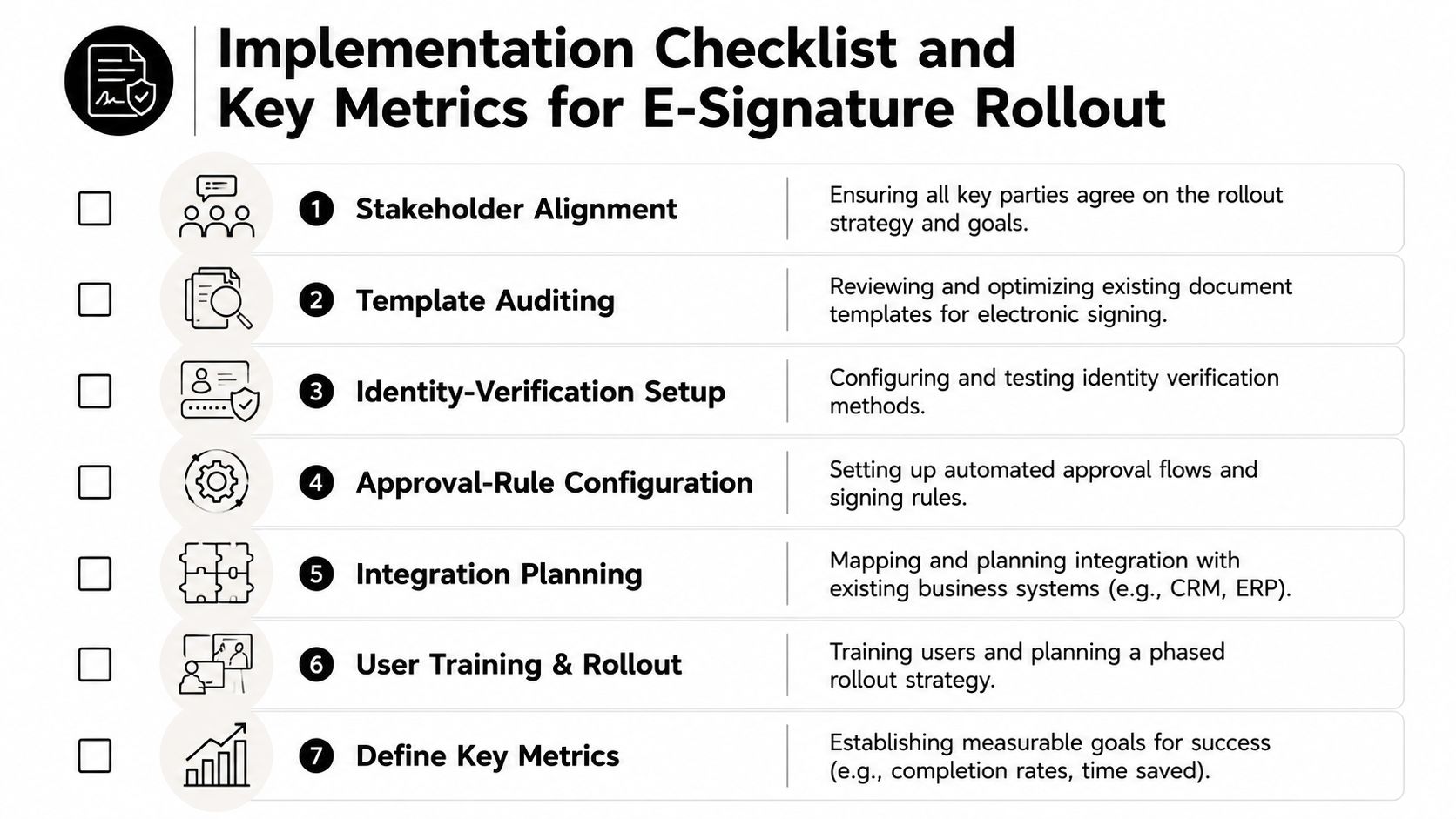
A practical rollout checklist
- Stakeholder alignment: Get legal, sales, procurement, finance, and IT to agree on approval paths and risk tiers.
- Template auditing: Clean up outdated clauses, duplicate templates, and missing signature fields.
- Identity-verification setup: Match authentication strength to document risk and jurisdiction.
- Approval-rule configuration: Define who reviews what, and in what order.
- Integration planning: Map where contract data should flow, especially from CRM, ERP, and CLM systems.
- User training and phased rollout: Start with a controlled use case before expanding across the business.
- Metric definition: Decide what success looks like before launch.
Those steps work better when the team can see the numbers behind them. A dashboard should track time-to-signature, signature completion rate, abandonment rate, and storage-related efficiency gains. If your contract repository supports analytics, this e-signing metrics guide can help teams think through what to monitor and why.
How to read the metrics
A falling time-to-signature usually signals that routing, reminders, and approvals are working. A weak completion rate can point to friction in identity checks, confusing templates, or too many manual handoffs. Rising abandonment often means the packet is too complex for the use case, or the signer experience is clumsy on mobile.
Finance and legal ops should also watch how often executed agreements are found and reused. That's where contract intelligence matters, because repository analytics only help when the workflow feeds them clean records. If the data is good, teams can track obligations, renewals, and revenue risks after signature instead of treating execution as the end of the process.
Common Pitfalls and Sample Team Workflows
A bad workflow rarely fails all at once. It usually breaks in small ways, and the team keeps working around the break until the process becomes normal. That's why the same pattern keeps showing up in legal, sales, procurement, and finance.
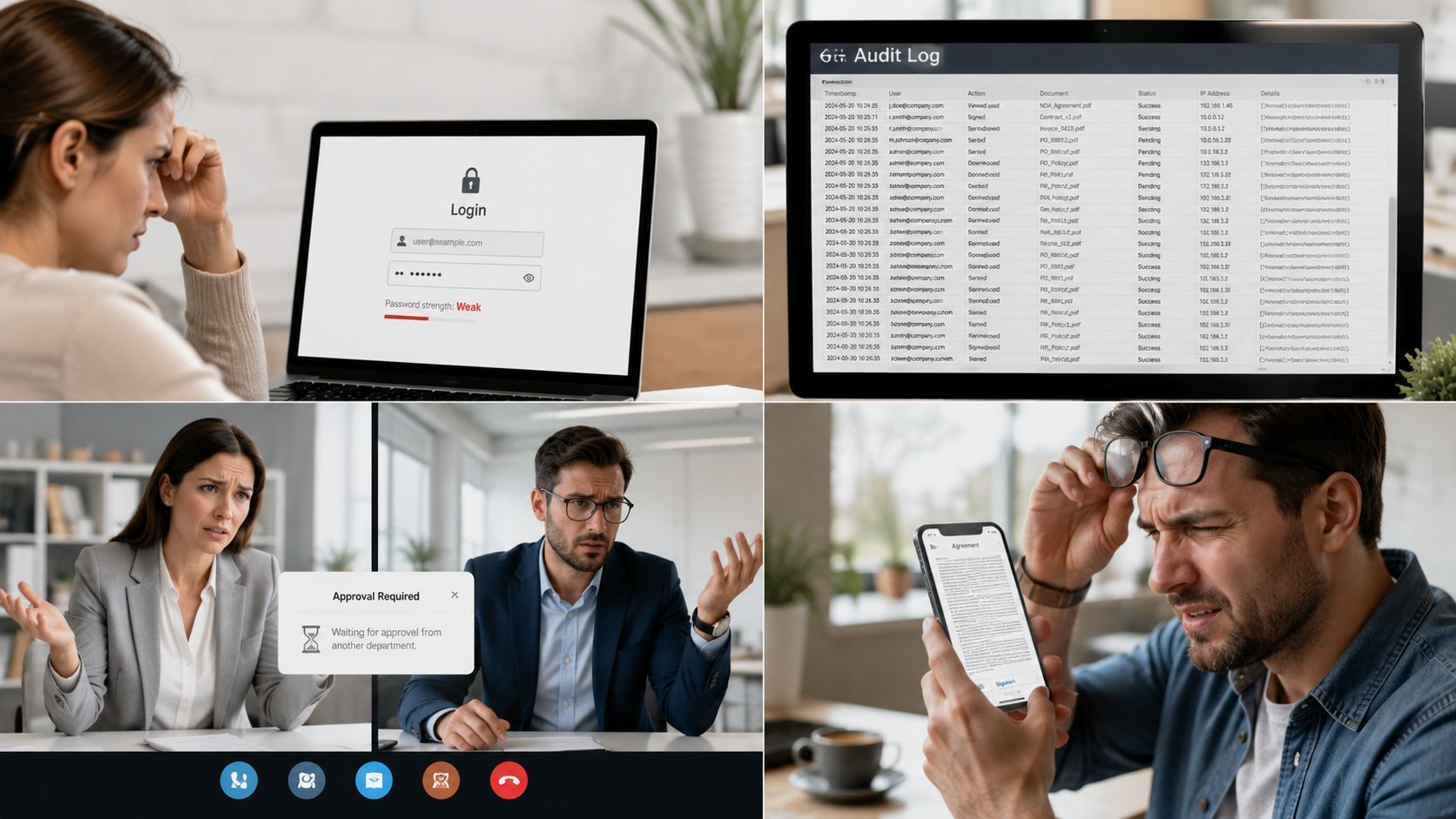
Four mistakes that slow teams down
Overly lax authentication creates avoidable risk. If anyone can sign anything with minimal checks, the record becomes harder to defend later, especially for sensitive agreements.
Neglected audit logs create a different problem. The packet may be signed, but the business can't easily show who opened it, who forwarded it, or which version went out.
Siloed approvals make the process opaque. A contract can sit in legal while sales assumes finance already reviewed it, and no one notices the gap until the customer asks for an update.
Ignoring mobile limits hurts completion. Signers aren't always at their desks, and if the signing experience is clumsy on a phone, the document waits until someone gets back to a laptop.
For a broader look at recurring mistakes, this guide on digital contract signing errors is a helpful companion.
What team-specific workflows look like
Legal teams usually need version control, review comments, and a clear approval chain before signature. Their workflow often starts with a redline review, then moves into final approval, then signature, then repository storage with audit evidence attached.
Sales teams care about speed. They need templates, automatic reminders, and real-time status tracking so a rep can see whether the customer has opened the packet, signed it, or ignored it. That visibility keeps deal momentum alive.
Procurement teams usually handle vendor onboarding, which means routing between risk, finance, and legal. They benefit from standard templates and approval rules because consistency reduces rework.
Finance teams focus on payment terms, authority, and evidence. Their workflow tends to emphasize execution records and the ability to show that the signed agreement matches the approved commercial terms.
The best workflows aren't identical across teams. They're consistent where control matters and flexible where speed matters.
Next Steps and Conclusion
A strong electronic signature workflow does more than collect signatures. It connects drafting, review, approval, identity verification, execution, and storage into one controlled business process. That improves speed, reduces compliance friction, and gives legal ops and contract managers a cleaner foundation for renewals, obligations, and contract intelligence.
AI-powered CLM platforms can tie those pieces together by generating templates, managing redlines, triggering eSignatures, and keeping every version searchable in one repository. The practical move is to start with one high-volume use case, define the success metrics, and then expand in phases. That approach keeps the rollout grounded in business value instead of abstract transformation language.
If your team wants faster contracting without losing control, now's the right time to pilot a workflow that matches your risk profile and cross-border needs. Choose the document type, set the rules, test the handoffs, and measure the result. Then scale only after the process proves it can handle real deal flow.
A CTA for Legitt AI to explore how contract drafting, review, eSignature, repository management, and workflow automation can fit into one AI-driven contract process.