You're already seeing it: a contract is “almost finished,” but the file everyone trusts is buried in email, one redline sits in Slack, a co-counsel version landed in a personal inbox, and nobody wants to open the wrong draft before signature. That's the core reason legal document management matters. It's not about putting files in a nicer folder, it's about controlling how legal information moves, who can change it, and how quickly the team can recover the authoritative version when audit pressure hits.
The market reflects that pressure. The legal document management software market was estimated at $2.98 billion in 2025, rose to $3.43 billion in 2026 with a 14.9% CAGR, and is projected to reach $5.5 billion by 2030 according to Research and Markets. At the same time, a broader benchmark says 96% of teams still cannot find the latest document version, and that inefficiency costs nearly $20,000 per worker per year according to MyHero. Those numbers explain why legal ops teams, procurement leaders, and revenue teams are moving this work out of shared drives and into governed systems.
What Legal Document Management Really Means
A contract gets sent to legal. Sales wants to close. Procurement wants the vendor redlined today. Then three versions appear, one in a shared drive, one in Outlook, one in a PDF attachment with “final” in the filename. That is the moment where a document repository stops being a storage problem and becomes an operational control problem.
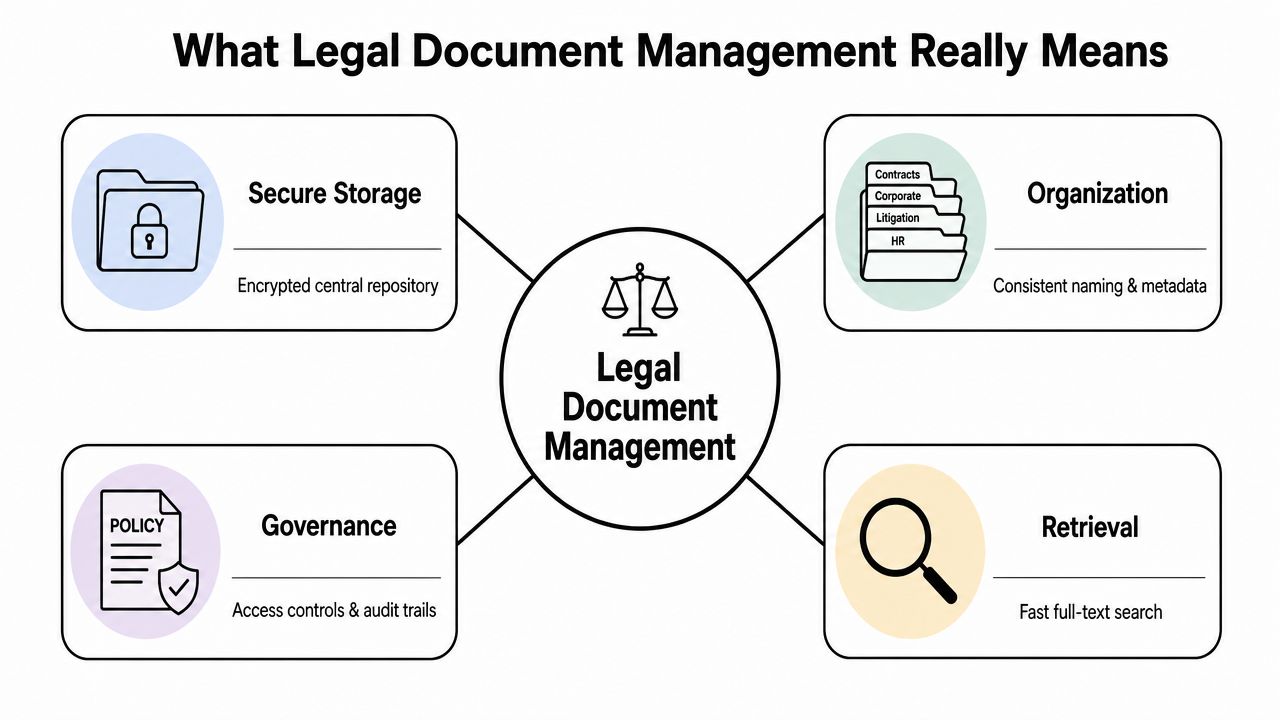
Legal document management is not just storage. It is the practice of securely storing, organizing, governing, and retrieving legal documents and emails, such as contracts, pleadings, and case files, while maintaining confidentiality, compliance, version control, and auditability throughout the document lifecycle, as described by Colligo. In practice, that means the system has to preserve the record of what changed, who touched it, and when it happened. Without that, the team can't defend a version as authoritative when a dispute, audit, or negotiation turns technical.
What belongs inside the system
A real system has to handle more than executed contracts. It needs to support pleadings, case files, amendments, supporting emails, drafts, and privilege-sensitive correspondence without losing context. That's why shared drives and consumer cloud tools fall short, they hold files, but they don't reliably preserve business meaning.
The practical line is simple. Storage keeps a file reachable. Governance keeps a file defensible. Retrieval keeps a file usable when someone needs the exact version, not just “a copy that looks close enough.”
Practical rule: if a reviewer can't answer who edited the file, when it was changed, and which version is authoritative, the system isn't really managing legal documents yet.
For teams building out contract lifecycle management, the link to workflow becomes obvious. A governed repository supports contract review, approvals, and post-signature tracking. It also supports enterprise contract workflows that need controlled access and reliable search across matters, counterparties, and amendments. For a broader primer on that workflow context, see what contract management looks like in practice.
Core Capabilities Every System Must Deliver
The most common mistake in platform selection is judging software by the interface instead of the control model. A clean dashboard doesn't matter if the system can't protect metadata, prevent version collisions, or surface the right draft in seconds.
The non-negotiable capabilities
A workflow should assign a unique matter number at intake, log metadata immediately on receipt, use zero-padded version numbers such as v001 and v002, and apply check-in/check-out procedures to prevent simultaneous editing, according to Altia MCX. Those mechanics sound basic because they are, and that's exactly why they're so often missing in messy organizations.
Here's the checklist I use when evaluating a platform:
- Centralized storage with encryption. The repository needs a single source of truth, not duplicate silos with different permission models.
- Version control that works under pressure. Check-in/check-out, visible version history, and clear authoritative labeling such as FINAL or FILED prevent draft confusion.
- OCR-backed search. Scanned paper files need searchable text, not just images.
- Role-based access controls. Legal, finance, sales, and outside counsel should not have the same visibility by default.
- Metadata preservation. The system has to keep provenance intact during viewing, annotation, and collaboration.
- Structured workflow routing. Approval paths should move documents through review without email bottlenecks.
The reason OCR matters is straightforward. For scanned and paper-origin records, OCR converts image files and PDFs into searchable text, which materially improves retrieval speed and reduces missed evidence in large repositories, as noted by Filevine. Just as important, visual redaction is not enough. If the underlying text still exists, the file can leak sensitive material.
If the redaction only hides text on screen, it's not secure redaction. It's a display trick.
For teams comparing contract management or CLM software, systems like Legitt AI often enter the conversation, because the useful platforms don't just store files, they connect drafting, review, approvals, signatures, and repository controls in one workflow. For a deeper product evaluation lens, see this repo analyzer guide.
Department-Specific Benefits Across the Organization
The strongest legal document management programs don't win because legal likes them. They win because every function gets a different operational payoff from the same control layer.
What each team gets
Legal teams care about version history, privilege protection, and defensible disclosure. Sales teams care about shorter back-and-forth between redline, approval, and signature. Procurement cares about obligations, renewals, and vendor compliance. Finance cares about exposure, leakage, and whether the contract repository accurately reflects reality.
| Department | Key Benefit | Operational Impact |
|---|---|---|
| Legal | Reliable version history and privilege review | Fewer accidental disclosures and cleaner audit trails |
| Sales | Structured approvals and eSignature routing | Faster deal progression with less email churn |
| Procurement | Central visibility into vendor obligations and renewals | Better compliance tracking across agreements |
| Finance | Cleaner access to executed contracts and amendments | Less exposure from stale or missing documents |
Legal teams usually feel the pain first because they inherit the chaos. A draft goes out without privilege review, a side letter gets attached to the wrong matter, or someone redlines against an obsolete version. A governed repository reduces that risk by making the latest file easy to find and the right approval path hard to bypass.
Sales sees value when the contract stops bouncing through inboxes. A structured approval workflow plus eSignature routing means the team spends less time asking who needs to sign next. Procurement gets the benefit of stronger obligation tracking, especially when contract metadata is consistent from intake through storage.
Finance and revenue operations care about whether the agreement can be trusted as a source of truth. If the executed copy, amendment history, and renewal date are buried across multiple folders, the business can't make reliable decisions. That's where contract intelligence starts to matter, because the repository becomes a business record, not just a filing cabinet.
Security and Compliance Beyond the Repository
A lot of legal tech messaging treats security like a feature checkbox. Encrypt the repository, add access controls, and the problem is solved. That framing misses where the risk lives, which is often outside the repository altogether.
The workflow risk surface
Intake documents may sit in personal email folders. Discovery materials move through consumer file-sharing tools. Co-counsel collaboration happens in channels the legal team doesn't control. The question is not only where the file is stored, it's how information moves, fails, and recovers across the full workflow.
That's why metadata integrity matters. A technically sound system should preserve metadata during viewing, annotation, and collaboration, because metadata can serve as evidence of provenance, authorship, and timeline, and altering it can weaken auditability and create compliance risk, according to Accusoft. In plain terms, if a viewer changes the record behind the file, you can lose part of the story that proves what happened.
The same applies to redaction and collaboration. If the redaction layer only masks text visually, sensitive content may still be recoverable. If annotations rewrite or strip metadata, the file may still exist, but the chain of custody gets thinner.
What good governance actually includes
A defensible program includes encryption, access controls, audit logs, backup verification, patching discipline, and disaster-recovery testing. It also includes governance across tools that people use anyway, because legal work doesn't stay neatly inside one platform. That's the hidden problem many teams underestimate.
For a broader view of how AI contract management systems handle privacy and data protection, see Legitt AI's security and privacy guidance. The practical takeaway is simple, the more uncontrolled the collaboration path, the more important it becomes to govern the handoff points.
Security isn't only about locking the vault. It's about controlling every door people actually use.
Implementation Roadmap and Governance Best Practices
The cleanest implementations start by admitting how scattered the documents already are. Files live in desks, filing cabinets, laptops, inboxes, cloud drives, and personal devices. Until that inventory is honest, the migration plan is fiction.
Start with intake and classification
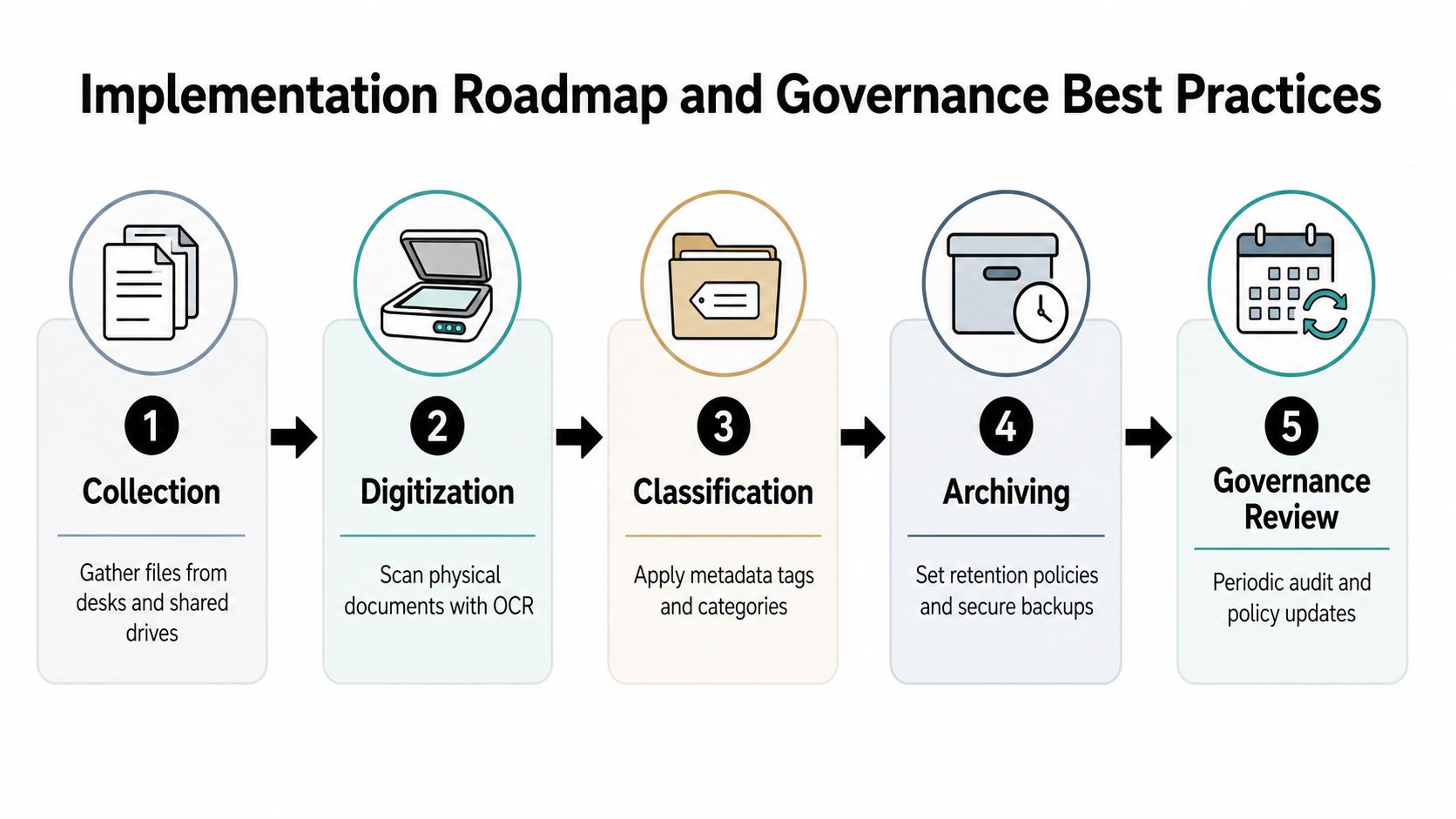
Best-practice legal document management includes collecting documents from desks, filing cabinets, computers, email, cloud storage, and personal devices, then classifying them into active, archived, duplicates, and obsolete, with quarterly or twice-yearly reviews to keep permissions and retention policies aligned with business needs, according to InCorp. That classification step matters more than many teams expect, because not every document deserves equal treatment.
For scanned records, OCR should be part of the intake flow so paper-origin content becomes searchable. PDF should be the standard format for locked, shareable versions. From there, naming conventions and metadata fields need to be standardized early, not patched in after users have already created their own habits.
Build controls that survive review
Access should be role-based, with two-factor authentication where feasible and clear ownership for permission changes. Privilege review has to happen before disclosure to opposing counsel or any third party. That checkpoint is not optional, because one accidental release can undo months of careful process design.
A practical rollout usually looks like this:
- Collect first. Pull in documents from all the places people have stored them informally.
- Normalize next. Apply naming standards, metadata tags, and OCR.
- Classify next. Separate active records from duplicates and obsolete files.
- Control access. Tighten permissions and log changes.
- Review regularly. Re-check retention, permissions, and workflow drift on a fixed cadence.
The teams that stick with it are the ones that treat governance as ongoing maintenance, not a one-time cleanup project. A clean repository in month one can turn messy again by month six if no one owns reviews.
Integration Patterns and Workflow Automation
A repository only becomes useful at scale when it's connected to the systems people already use. If the legal team still copies data between CRM, email, document review, and signature tools, the workflow remains fragile no matter how polished the platform looks.
Connect the systems people already touch
The best integrations reduce handoffs between sales, legal, procurement, and finance. CRM platforms like Salesforce or HubSpot can trigger contract generation. Microsoft 365 can support drafting and collaboration. Slack can carry notifications without becoming the source of record. REST APIs make it possible to connect custom systems when the standard connectors aren't enough.
That matters because the contract process is really a chain of decisions. A deal is created, a draft is generated, clauses get reviewed, approvals route through the right people, a signature is collected, and the executed file lands in the repository. When one of those handoffs depends on manual copying, the cycle slows and errors creep in.
Make the repository active
AI-powered drafting from templates, clause extraction, deviation analysis, and renewal alerts all turn the repository into an operational layer instead of a passive archive. That's especially useful for contract intelligence, because teams can spot patterns in third-party paper, identify missing obligations, and route exceptions faster.
For a practical integration example, see how Legitt AI connects with existing contract systems. Used well, this kind of setup keeps the legal team inside the governed workflow while still letting business users move quickly.
Automation should remove re-keying, not judgment. The human review point still belongs where risk is highest.
Common Pitfalls and How to Avoid Them
Most failed deployments do not break because the software cannot store files. They break because the organization keeps letting email, shared drives, consumer file-sharing, and co-counsel exchanges run beside the governed workflow. That creates a split record, and the repository stops being the place people trust when pressure rises.
The mistakes that keep showing up
Version control is still the first place things go wrong. Teams can end up working from the wrong draft, saving changes in parallel, or relying on an attachment that no one can later prove is current. In daily operations, that looks like duplicate review cycles and missed edits. In a deployment failure, it shows up as a system that exists, but never becomes the source of record.
Other mistakes show up in predictable ways:
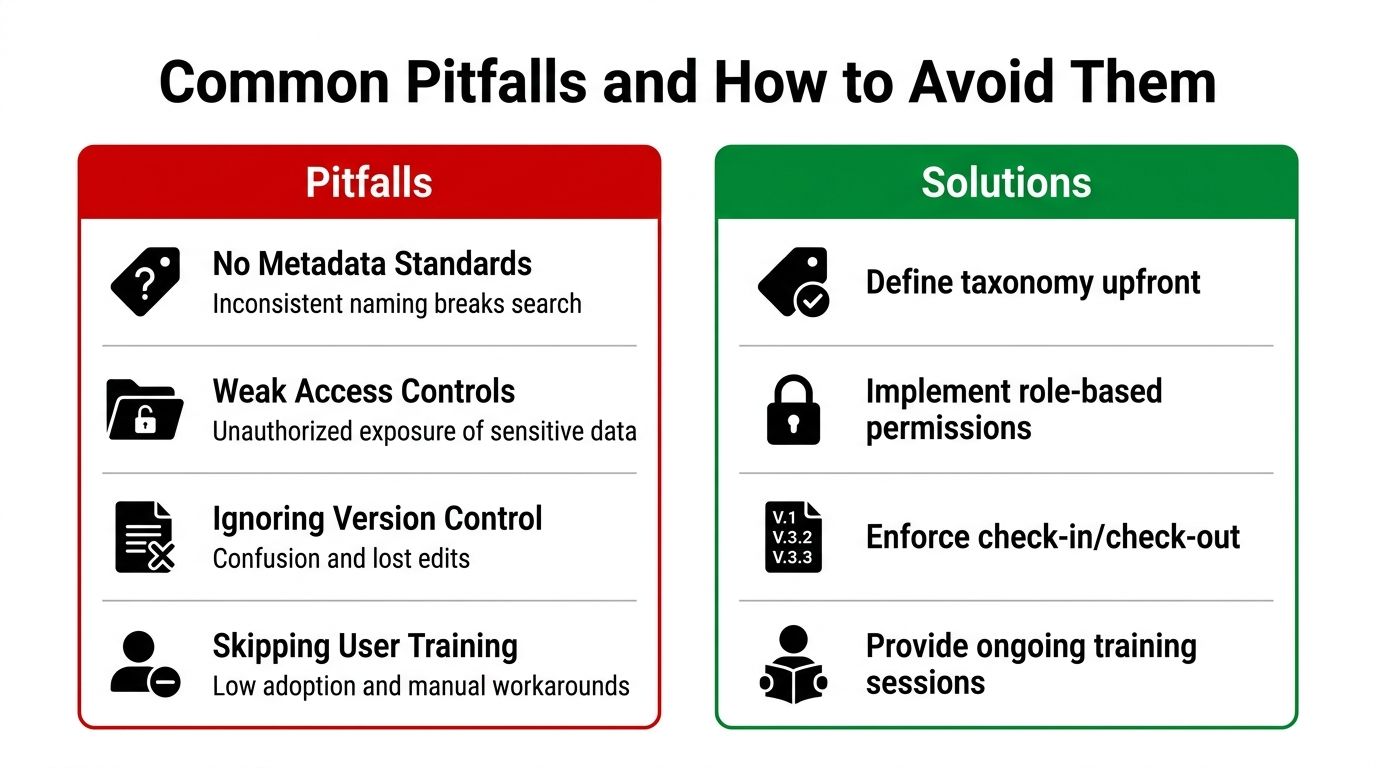
- No metadata standards. Search becomes unreliable because documents are named inconsistently and filed under different conventions.
- Weak access controls. Sensitive content spreads beyond the people who should see it, especially when files move outside the repository.
- Ignoring version control. People edit the wrong draft, overwrite useful changes, or send out obsolete language.
- Skipping training. Users fall back to email attachments, shared-drive habits, and side-channel approvals.
The fix is operational, not cosmetic. Define the taxonomy upfront, then enforce it consistently. Set role-based permissions, require check-in and check-out, and make sure users understand how the repository supports their work instead of treating it as a storage bin. If you want a practical comparison framework for platforms that can hold up under this kind of discipline, review Legitt AI's guide to legal document management software.
OCR is another place teams get burned. If paper-origin files stay as images, search breaks down, reviewers miss text that should have been indexed, and evidence can sit outside the workflow longer than anyone realizes. Disaster recovery deserves the same scrutiny. A backup that looks fine on paper does not prove recovery will work when the team needs the repository back under pressure.
Retention and permissions get deferred too often until an audit is already underway. By then, cleanup is slower, exceptions are harder to explain, and the process gap has become a compliance story. That is why governance has to start before the first broad rollout, not after the first exception report.
Choosing the Right Platform and Getting Started
The right platform should support AI-native contract drafting and review, built-in eSignature with role-based routing, searchable repository management, clause extraction, obligation tracking, and deep integration with the tools your teams already use. If a system only stores files, it's not enough for modern legal operations.
For a practical comparison framework, review Legitt AI's guide to legal document management software. Then run a pilot against real workflows, not a feature checklist. Test intake, redlining, approval routing, signature, storage, and retrieval with actual users from legal, sales, procurement, and finance.
Measure what matters: how often the team finds the right version, how cleanly approvals move, and whether the repository reduces compliance gaps and revenue leakage. If the pilot only looks good in demos, it isn't ready.
If your team is still managing contracts across inboxes, shared drives, and disconnected approval chains, Legitt AI gives you one workspace for drafting, review, eSignature, repository management, and contract intelligence. Visit Legitt AI to see how it can fit into your legal document management workflow and tighten the handoffs between legal, sales, procurement, and finance.